
If you're looking to enhance your trading strategy, the XCCI Histogram Vol Direct indicator could be your new best friend. This trading system generates signals based on the changes in histogram direction, which you can easily spot thanks to the five-pointed stars that change color when a bar closes.
To get the most out of this Expert Advisor (EA), make sure you have the compiled XCCI_Histogram_Vol_Direct.ex5 file handy in your <terminal_data_directory>\MQL5\Indicators folder. This step is crucial for the EA to function correctly.
For the tests shown below, we used the default input parameters without any stop losses, so keep that in mind when you tweak your settings.
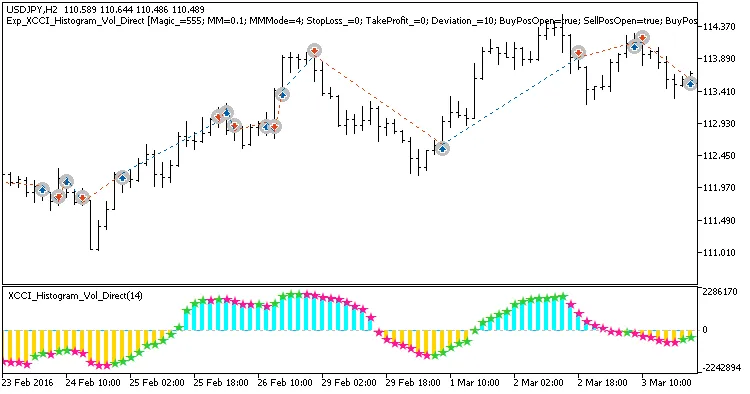
Fig. 1. Examples of trades on the chart
Here’s a look at the testing results for USDJPY on the H2 timeframe throughout 2017:
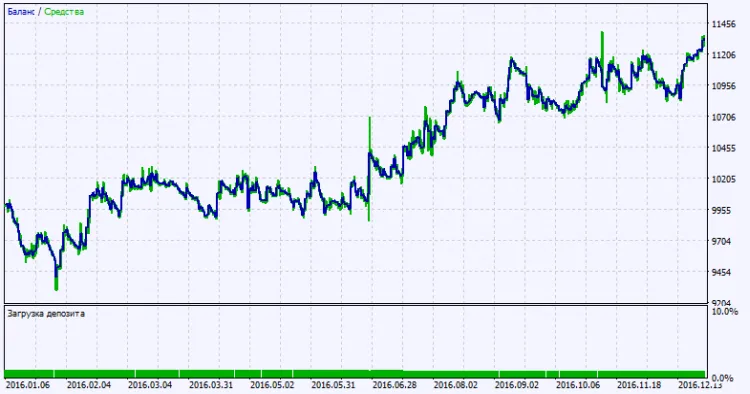
Fig. 2. Test results chart




Comments 0