
Meet Your New Trading Ally: The Grid Assistant
If you’re looking to streamline your trading strategies, the Grid Assistant for MetaTrader 4 is just what you need. This semi-automatic tool helps you manage your grids effectively and efficiently.
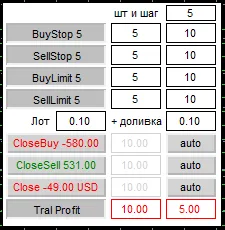
Quick Access Buttons
- Buy Stop: Open a grid of buy stop pending orders
- Sell Stop: Open a grid of sell stop pending orders
- Buy Limit: Open a grid of buy limit pending orders
- Sell Limit: Open a grid of sell limit pending orders
- Close Buy: Close all opened buy positions
- Close Sell: Close all opened sell positions
- Close: Close all opened positions
- Trail Profit: Activate trailing profit for all positions starting from ProfitStart
Expert Settings
- OrdersBuyStop: Specify the number of orders in the BuyStop grid
- OrdersSellStop: Specify the number of orders in the SellStop grid
- OrdersBuyLimit: Specify the number of orders in the BuyLimit grid
- OrdersSellLimit: Specify the number of orders in the SellLimit grid
- StepBuyStop: Define the step between orders in the BuyStop grid
- StepSellStop: Define the step between orders in the SellStop grid
- StepBuyLimit: Define the step between orders in the BuyLimit grid
- StepSellLimit: Define the step between orders in the SellLimit grid
- Lot: Set the lot size for the first order, with subsequent sizes calculated based on a formula
- LotPlus: Additional increment to the initial lot size
For example:
- Lot = 0.1
- LotPlus = 0.1
- First lot: 0.1
- Second lot: 0.2 (0.1 + 0.1)
- Third lot: 0.3 (0.2 + 0.1)
- Fourth lot: 0.4 (0.3 + 0.1)
- FirstLevel: Distance from the price to the first order (if set to 0, it opens at the stop level). Adjust this in the top right corner of the panel.
Profit Taking Methods
- ProfitClose: Set a target profit in your deposit currency (e.g., $100; the grid will close once it hits this profit).
- ProfitStart: Establish a profit level to start trailing, for instance, $50.
- TrailClose: Close the grid if profit decreases to a specified level (e.g., $20).
For instance, if your profit hits $50 and trailing starts, but then it rolls back to $20, you’ll still walk away with $40 in profit. Plus, once the pending orders are cleared, an alert will pop up asking if you want to continue. Just hit OK, and the grid is set up again!
Order Closing Features
The EA first tries to close all orders with opposite ones before shutting down market positions and pending orders.
Feel free to test and customize the EA in the strategy tester, but remember to use Visual mode only, as it doesn't operate buttons on its own!




Comments 0