
Hey there, fellow traders! Today, let’s dive into the Exp_NRTR_ATR_STOP_Tm Expert Advisor (EA) for MetaTrader 5. This handy tool is built on the NRTR_ATR_STOP indicator signals and comes with a nifty feature that allows you to set a specific trading time window.
So, how does it work? A trading signal pops up at the close of a bar if a big colored star appears. Pretty straightforward, right?
Set Your Trading Time
You can customize your trading timeframe right in the input parameters. Here’s how:
inputbool TimeTrade=true; //Enable trading in the specified intervalinput HOURS StartH=ENUM_HOUR_0; //Trading starts at (hours)input MINUTS StartM=ENUM_MINUT_0; //Trading starts at (minutes)input HOURS EndH=ENUM_HOUR_23; //Trading ends at (hours)input MINUTS EndM=ENUM_MINUT_59; //Trading ends at (minutes)
There are two sets of variables for your start and end times—one for hours and one for minutes. By default, this EA is set to trade the entire session from 00:00 to 23:59, closing all positions by the end of the day.
If you happen to set a start time that’s later than your end time, don’t worry! The EA will simply close positions the following day at your specified time.
Getting Started
For everything to run smoothly, make sure you add the NRTR_ATR_STOP.ex5 compiled indicator file to your <terminal_data_folder>\MQL5\Indicators folder.
The testing results below were obtained using the default settings of the EA, without any Stop Loss or Take Profit parameters:
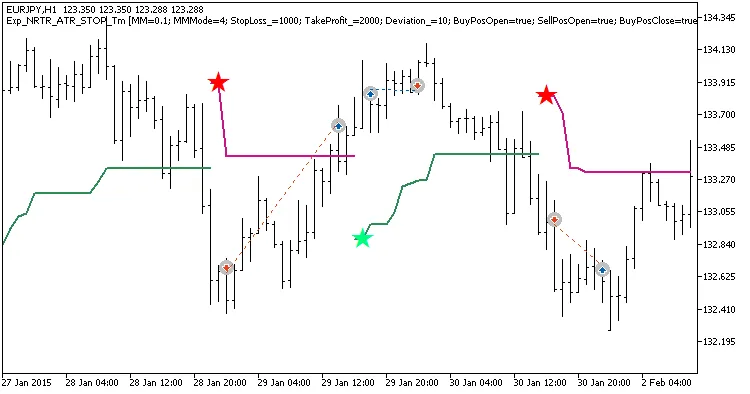
Fig.1. Examples of deals on the chart
Here are the testing results from 2015 on the EURJPY H1 timeframe:
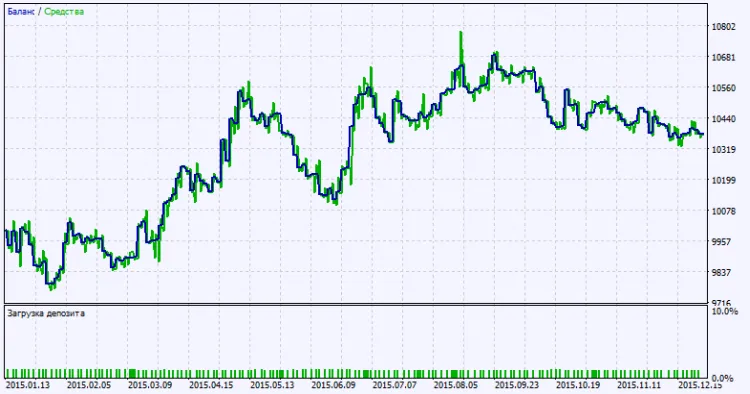
Fig. 2. Testing results chart




Comments 0