
Hey fellow traders! Today, I want to dive into an exciting trading system that could give your trading strategy a serious boost: the Exp_CMO_Duplex for MetaTrader 5. This system features two identical setups based on the crossover of the CMO indicator and the zero line, allowing for both long and short trades. You can customize it in a variety of ways within a single Expert Advisor (EA).
Understanding the Input Parameters
The input parameters for this EA can be grouped into two main categories:
- Parameters starting with 'L' - These are used to manage long positions.
- Parameters starting with 'S' - These handle short positions.
Long Position Parameters
//+----------------------------------------------+//| EA's input parameters for long positions |//+----------------------------------------------+inputuint L_Magic=777; //L magic numberinputdouble L_MM=0.1; //L share of a deposit per tradeinput MarginMode L_MMMode=LOT; //L lot setting mode
Short Position Parameters
//+----------------------------------------------+//| EA's input parameters for short positions |//+----------------------------------------------+inputuint S_Magic=555; //S magic numberinputdouble S_MM=0.1; //S share of a deposit per tradeinput MarginMode S_MMMode=LOT; //S lot setting mode
Each system uses a unique magic number, making them independent of each other. Remember, the financial markets aren’t always a mirror image. You might need different parameters for trading in a bull market compared to a bear market. To fine-tune the EA, start by testing one system at a time and disable the other using the designated switchers.
Setting Permissions
inputbool L_PosOpen=true; //L permission to enter long positionsinputbool L_PosClose=true; //L permission to exit long positions
Do the same for the second system. For the EA to function correctly, make sure you add the compiled CMO.ex5 indicator file to <terminal_data_folder>\MQL5\Indicators.
The tests shown below were conducted using the default input parameters of the EA. Please note that Stop Loss and Take Profit were not utilized during these tests.
Testing Results
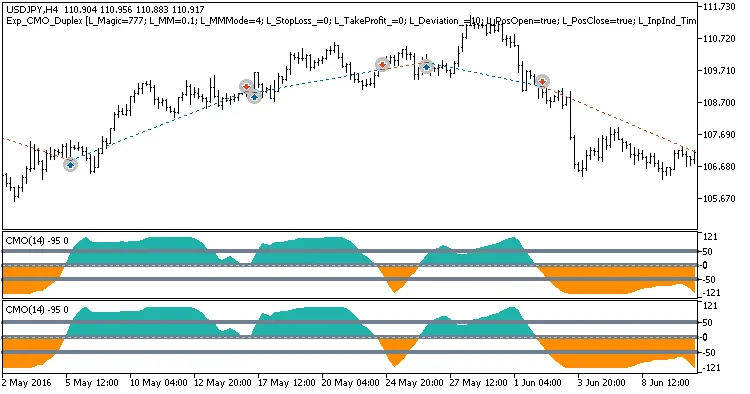
Fig.1. Examples of deals on the chart with symmetrical settings
Here are the testing results for 2016 on the USDJPY H4:
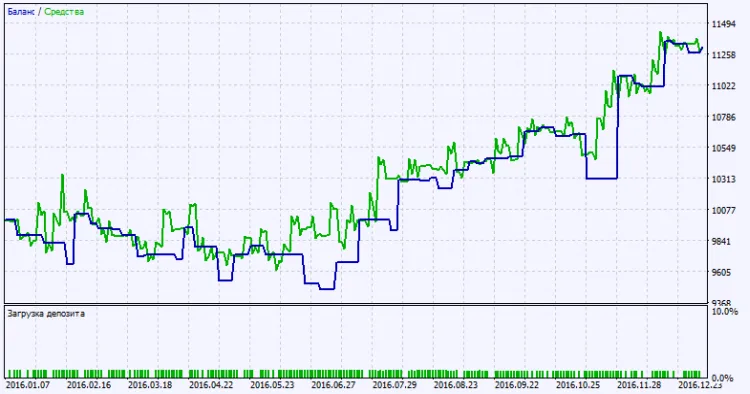
Fig. 2. Testing results chart
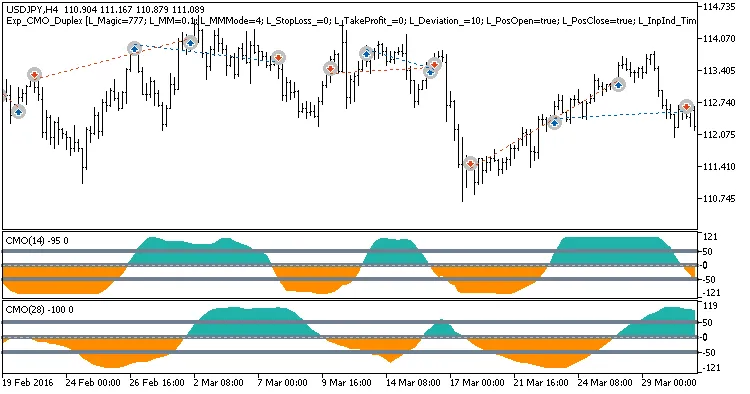
Fig.2. Examples of deals on the chart with non-symmetrical settings




Comments 0