
MQL5 Wizard makes it easy to whip up Expert Advisor (EA) code quickly. If you’re curious about creating your own EAs, check out Creating Ready-Made Expert Advisors in MQL5 Wizard for the full scoop.
Today, we’re diving into a trading strategy that’s all about the crossover of two Exponential Moving Averages (EMAs). While moving averages can be fantastic when trends are strong, they can also lead to a fair amount of false signals when the market is choppy. One way to enhance this strategy is by incorporating time filters—like only opening new positions during the European trading session.
In this post, we’ll discuss the strategy dubbed "EMA Crossover Signals with Intraday Time Filter"—a nifty tool you can set up in MQL5 Wizard.
Trade Signals:
- To open a long position: The Fast EMA crosses above the Slow EMA, and the intraday time filter conditions are satisfied.
- To open a short position: The Fast EMA crosses below the Slow EMA, and the intraday time filter conditions are satisfied.
This approach is implemented in the CSignal2EMA_ITF class.
This system operates with pending orders, where price levels are determined based on moving average values, and we utilize the Average True Range (ATR) for calculations.
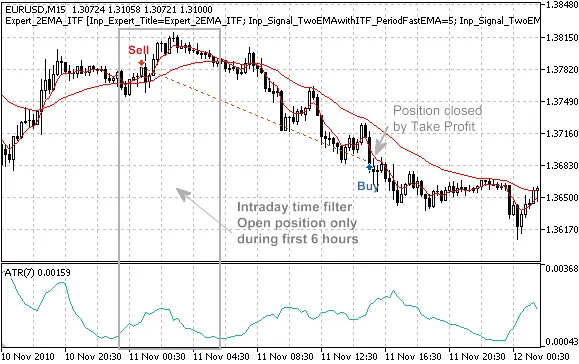
Figure 1. Trade signals, based on crossover of two EMA with intraday time filter
Trade Signals Overview
The CSignal2EMA_ITF class has several protected methods to simplify access to indicator values:
double  FastEMA(int ind)      // returns fast EMA value
double  SlowEMA(int ind)      // returns slow EMA value
double  StateFastEMA(int ind) // returns state of fast EMA
double  StateSlowEMA(int ind) // returns state of slow EMA
double  StateEMA(int ind)     // returns difference between fast and slow EMA
double  ATR(int ind)          // returns ATR value
- If Limit>0: The system will enter on a pullback when a false breakdown occurs, placing Buy Limit and Sell Limit orders based on trading signals.
- If Limit<0: The system will enter in the direction of price movement, placing Buy Stop and Sell Stop orders based on trading signals.
- If Limit=0: The system will trade at market prices.
1. Opening a Long Position
The system checks if the conditions for opening a long position are met: specifically, if the difference between the fast and slow EMA on the last completed bar has changed its sign from negative to positive (StateEMA(1)>0 && StateEMA(2)<0).
Next, it verifies the intraday time filter using the CheckOpenLong() method from the CSignalITF class. Once trading is permitted, it calculates the base price level (the EMA value) and the ATR range of the last completed bar.
Depending on the Limit input parameter, it places a buy pending order. The order price, Take Profit, and Stop Loss levels are all calculated relative to this base price level (in ATR units). The order expiration time is defined by the Expiration input parameter.
//+------------------------------------------------------------------+
//| Checks conditions to open long position (buy)                     |
//+------------------------------------------------------------------+
bool CSignal2EMA_ITF::CheckOpenLong(double& price,double& sl,double& tp,datetime& expiration)
  {
   if(!(StateEMA(1)>0 && StateEMA(2)<0))     return(false);
   if(!m_time_filter.CheckOpenLong(price,sl,tp,expiration)) return(false);
//---
   double ema=SlowEMA(1);
   double atr=ATR(1);
   double spread=m_symbol.Ask()-m_symbol.Bid();
//---
   price=m_symbol.NormalizePrice(ema-m_limit*atr+spread);
   sl   =m_symbol.NormalizePrice(price+m_stop_loss*atr);
   tp   =m_symbol.NormalizePrice(price-m_take_profit*atr);
   expiration+=m_expiration*PeriodSeconds(m_period);
//---
   return(true);
  }
2. Closing a Long Position
In this strategy, the method that checks for closing a long position always returns false, indicating that the position will be closed by either Take Profit or Stop Loss. You can always customize this to suit your needs.
//+------------------------------------------------------------------+
//| Checks conditions to close long position                         |
//+------------------------------------------------------------------+
bool CSignal2EMA_ITF::CheckCloseLong(double& price)
  {
   return(false);
  }
3. Opening a Short Position
To open a short position, the system checks if the difference between the fast and slow EMA on the last completed bar has changed from positive to negative (StateEMA(1)<0 && StateEMA(2)>0).
It then verifies the intraday time filter using the CheckOpenLong() method of the CSignalITF class. If trading is allowed, it calculates the base price level (the EMA value) and the ATR range of the last completed bar.
Depending on the Limit input parameter, it will place a sell pending order. The order price, Take Profit, and Stop Loss levels are calculated relative to this base price level (in ATR units). The order expiration time is defined by the Expiration input parameter.
//+------------------------------------------------------------------+
//| Checks conditions to open short position (sell)                  |
//+------------------------------------------------------------------+
bool CSignal2EMA_ITF::CheckOpenShort(double& price,double& sl,double& tp,datetime& expiration)
  {
   if(!(StateEMA(1)<0 && StateEMA(2)>0))     return(false);
   if(!m_time_filter.CheckOpenShort(price,sl,tp,expiration)) return(false);
//---
   double ema=SlowEMA(1);
   double atr=ATR(1);
//---
   price      =m_symbol.NormalizePrice(ema+m_limit*atr);
   sl         =m_symbol.NormalizePrice(price+m_stop_loss*atr);
   tp         =m_symbol.NormalizePrice(price-m_take_profit*atr);
   expiration+=m_expiration*PeriodSeconds(m_period);
//---
   return(true);
  }
4. Closing a Short Position
Similar to the long position, the method checking for closing a short position also always returns false, assuming that the position will be closed by Take Profit or Stop Loss. Feel free to customize this method as needed.
//+------------------------------------------------------------------+
//| Checks conditions to close short position                        |
//+------------------------------------------------------------------+
bool CSignal2EMA_ITF::CheckCloseShort(double& price)
  {
   return(false);
  }
5. Trailing Stop for Buy Pending Order
The EA will trail pending orders based on the current value of moving averages and ATR.
//+--------------------------------------------------------------------+
//| Checks conditions to modify pending buy order                      |
//+--------------------------------------------------------------------+
bool CSignal2EMA_ITF::CheckTrailingOrderLong(COrderInfo* order,double& price)
  {
//--- check
   if(order==NULL) return(false);
//---
   double ema=SlowEMA(1);
   double atr=ATR(1);
   double spread=m_symbol.Ask()-m_symbol.Bid();
//---
   price=m_symbol.NormalizePrice(ema-m_limit*atr+spread);
//---
   return(true);
  }
6. Trailing Stop for Sell Pending Order
Similarly, the EA will also trail pending orders for short positions based on moving averages and ATR.
The order will be executed if the market price reaches the order price.
//+--------------------------------------------------------------------+
//| Checks conditions to modify pending sell order                      |
//+--------------------------------------------------------------------+
bool CSignal2EMA_ITF::CheckTrailingOrderShort(COrderInfo* order,double& price)
  {
//--- check
   if(order==NULL) return(false);
//---
   double ema=SlowEMA(1);
   double atr=ATR(1);
//---
   price=m_symbol.NormalizePrice(ema+m_limit*atr);
//---
   return(true);
  }
Creating an EA Using MQL5 Wizard
To build your trading robot based on this strategy, select the signal properties titled "EMA Crossover Signals with Intraday Time Filter" in the MQL5 Wizard:

Figure 2. Select "EMA Crossover Signals with Intraday Time Filter" in MQL5 Wizard
Next, specify the trailing stop algorithm and the money management system you need. The EA code will be generated automatically, and you can compile it to test in the Strategy Tester on the MetaTrader 5 client terminal.
Testing Results
Let’s take a look at the backtesting results of our EA using historical data (EUR/USD H1, testing period: 1.1.2010-05.01.2011, PeriodFastEMA=5, PeriodSlowEMA=30, PeriodATR=7, Limit=1.2, StopLoss=5, TakeProfit=8, Expiration=4). We used a fixed trading volume (Fixed Lot Trading, 0.1), and we did not apply a trailing stop algorithm (No Trailing Used).
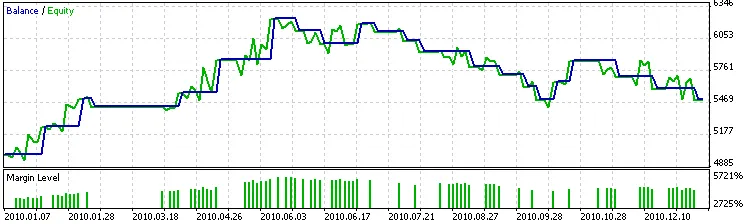
Figure 3. Backtesting Results without Intraday Time Filter
Since we didn't implement the intraday filter, we encountered a lot of false signals. Analyzing the results based on timeframes can significantly enhance trading signals.
In our analysis, we found that EMA crossovers tend to produce a plethora of false signals between 6:00 and 23:59. By establishing an intraday time filter, we can specify when to allow new positions to be opened.
For instance, we can configure the time filter to permit positions only from 0:00 to 5:59. This can be achieved by setting BadHoursOfDay=16777152=111111111111111111000000b. This way, we can prevent new positions from being opened during the less favorable hours.
Implementing this filter greatly reduces false signals:
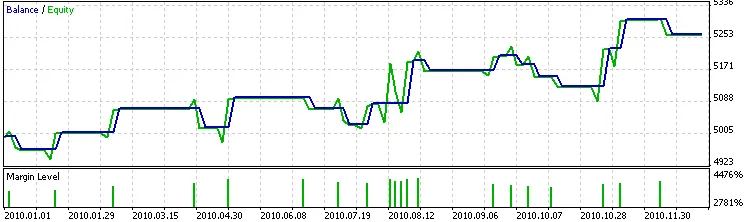
Figure 4. Testing Results with Intraday Time Filter
The CSignalITF class provides various options for time filtration, allowing you to specify




Comments 0