
MQL5 Wizard is a game changer for traders looking to automate their strategies. It helps you create Expert Advisors (EAs) effortlessly. For more details, check out Creating Ready-Made Expert Advisors in MQL5 Wizard.
In this post, we're diving into a strategy that revolves around the crossover of two Exponentially Smoothed Moving Averages (EMA)—the fast EMA and the slow EMA. This strategy is referred to as "Signals based on crossover of two EMA" when you're generating your EA in the MQL5 Wizard.
Trade Signals:
- Buy: Triggered when the Fast EMA crosses above the Slow EMA.
- Sell: Triggered when the Fast EMA crosses below the Slow EMA.
This strategy is encapsulated in the CSignalCrossEMA class.
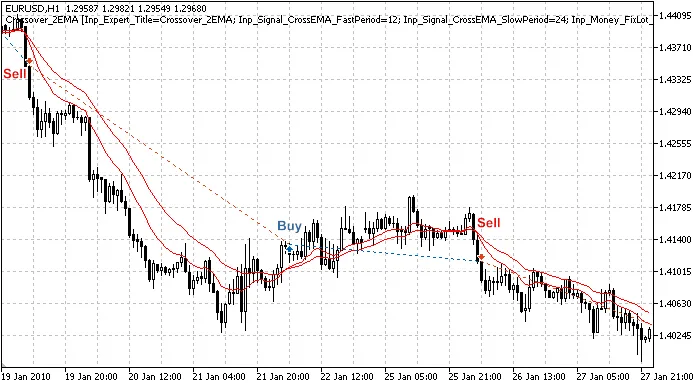
Figure 1. Trade signals based on crossover of two exponentially smoothed moving averages
Understanding the Trade Signals
The trading logic is implemented in the CSignalCrossEMA class, which includes some handy methods for easy access to indicator values:
double FastEMA(int ind) // returns the fast moving average of the bardouble SlowEMA(int ind) // returns the slow moving average of the bardouble StateEMA(int ind) // returns the difference between fast and slow moving averages
1. Opening a Long Position
To open a long position, you need to meet this condition:
- StateEMA(1) > 0 and StateEMA(2)
//+------------------------------------------------------------------+//| Checks conditions to open long position (buy)                 |//+------------------------------------------------------------------+bool CSignalCrossEMA::CheckOpenLong(double& price,double& sl,double& tp,datetime& expiration)
  {
   if(!(StateEMA(2)0 && StateEMA(1)>0)) return(false);
//---
   price=0.0;
   sl   =0.0;
   tp   =0.0;
//---
   return(true);
  }
2. Closing a Long Position
The conditions to close a long position are:
- StateEMA(1) 0: This indicates the Fast EMA has crossed below the Slow EMA on the last completed bar.
//+------------------------------------------------------------------+//| Checks conditions to close long position                      |//+------------------------------------------------------------------+bool CSignalCrossEMA::CheckCloseLong(double& price)
  {
   if(!(StateEMA(2)>0 && StateEMA(1)0)) return(false);
//---
   price=0.0;
//---
   return(true);
  }
3. Opening a Short Position
To open a short position, the conditions mirror those for closing a long position.
//+------------------------------------------------------------------+//| Checks conditions to open short position (sell)                |//+------------------------------------------------------------------+bool CSignalCrossEMA::CheckOpenShort(double& price,double& sl,double& tp,datetime& expiration)
  {
   if(!(StateEMA(2)>0 && StateEMA(1)0)) return(false);
//---
   price=0.0;
   sl   =0.0;
   tp   =0.0;
//---
   return(true);
  }
4. Closing a Short Position
The conditions to close a short position are identical to those for opening a long position.
//+------------------------------------------------------------------+//| Checks conditions to close short position                      |//+------------------------------------------------------------------+bool CSignalCrossEMA::CheckCloseShort(double& price)
  {
   if(!(StateEMA(2)0 && StateEMA(1)>0)) return(false);
//---
   price=0.0;
//---
   return(true);
  }
Creating Your Expert Advisor with MQL5 Wizard
To set up your trading robot based on this strategy, simply select the signal property as "Signals based on crossover of two EMA" in the MQL5 Wizard under Creating Ready-Made Expert Advisors:

Figure 2. Choose 'Signals based on crossover of two EMA' in MQL5 Wizard
Next, specify your desired trailing stop algorithm and money and risk management systems. The EA code will be generated automatically, allowing you to compile and test it in the Strategy Tester of the MetaTrader 5 terminal.
Moreover, the Standard Library contains a class for "Signals based on crossover of two MA", implemented in the CSignalCrossMA class. This approach is similar but offers additional features, such as different types, shifts, averaging methods, and the use of Take Profit and Stop Loss levels.

Figure 3. 'Signals based on crossover of two MA' in MQL5 Wizard
Testing Results
Now, let’s take a look at backtesting results for our EA using historical data (EURUSD H1, testing period: 1.1.2010-05.01.2011, FastPeriod=12, SlowPeriod=24).
For this EA, we utilized fixed volume trading (Fixed Lot Trading, 0.1), and no trailing stop algorithm was used (Trailing not applied).
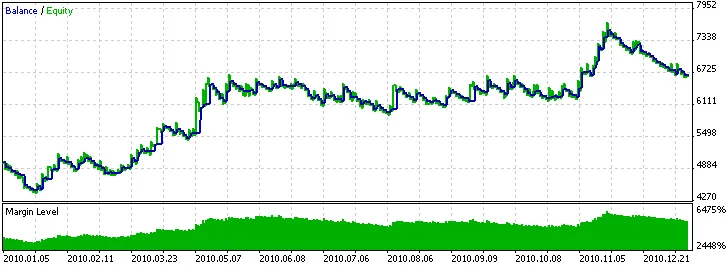
Figure 4. Historical backtesting results of the Expert Advisor based on crossover of two EMA
Attachments: The SignalCrossEMA.mqh file containing the CSignalCrossEMA class should be placed in the terminal_data_folder\MQL5\Include\Expert\Signal folder. The crossover_2ema.mq5 file contains the EA code generated with the MQL5 Wizard.




Comments 0