
Hey fellow traders! Today, I'm excited to share some insights on an enhanced version of the Previous Candle Breakdown EA for MetaTrader 5 that can take your trading game to the next level.
This updated EA comes packed with new features that make it even more user-friendly. Here’s a quick rundown of the added parameters:
- Start Time (Hour) - The hour when trading begins.
- Start Time (Minute) - The minute when trading kicks off.
- End Time (Hour) - The hour when trading stops.
- End Time (Minute) - The minute when trading ends.
One of the cool features is that the trailing stop now operates at every tick, giving you a better chance to lock in profits as the market moves.
The EA is designed to monitor any timeframe, from 1 minute to 1 month. It checks for a breakdown of the previous candle in the specified timeframe. Plus, you can enable two filters using Moving Averages to help refine your strategy.
Another great addition is the trailing stop feature, which adjusts the Stop Loss to breakeven on the first modification. This gives you peace of mind when the trade goes your way!
When it comes to position sizing, you’ve got options. You can set a fixed lot size (with Lots above zero and Risk set to zero) or let the EA calculate it dynamically based on your risk percentage per trade (with Risk above zero and Lots set to zero).
Important: Avoid scenarios where:
- Both Lots and Risk are above zero;
- Both Lots and Risk are set to zero.
Once you hit your target profit, the EA can automatically close all positions when the profit goal is achieved. It ensures that no more than one position in each direction is opened based on the Previous Candle Breakdown strategy.
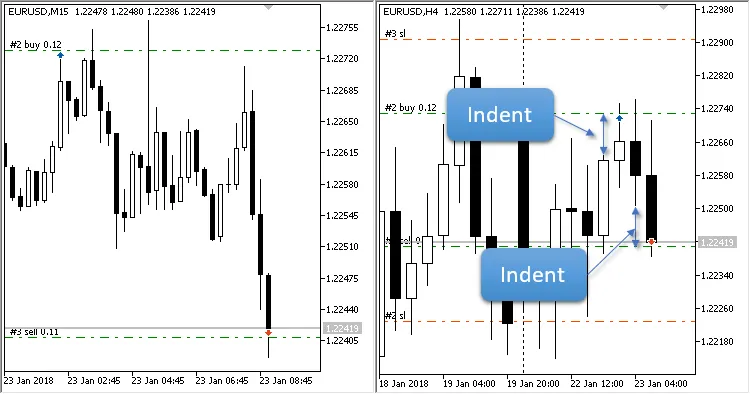
Fig. 1. Current timeframe: M15, breakdown is set to H4
Input Parameters
- Previous Candle Breakdown - The timeframe of the candle to be analyzed;
- Indent from High or Low - The distance from the High and Low of the broken candle;
- Fast: av. period - Averaging period for the Fast Moving Average; set to zero to disable this filter;
- Fast: horizontal shift - Horizontal adjustment for the Fast Moving Average;
- Fast: type of price - The type of price used for the Fast Moving Average calculation;
- Slow: av. period - Averaging period for the Slow Moving Average; set to zero to disable this filter;
- Slow: horizontal shift - Horizontal adjustment for the Slow Moving Average;
- Slow: type of price - The type of price used for the Slow Moving Average calculation;
- Fast and Slow: smoothing type - The averaging type for both Fast and Slow;
- Stop Loss - Set your stop loss level;
- Take Profit - Set your take profit level;
- Trailing Stop - Activates trailing, moving to breakeven on the first Stop Loss modification;
- Trailing Step - The step value for the trailing stop;
- Lots - Fixed lot size (set Risk to zero);
- Risk - Dynamic lot size based on risk percentage per trade (set Lots to zero);
- Maximum number of positions in one direction - Limit your positions in one direction;
- Close all positions when profit is achieved - Automatically close positions once profit is reached.




Comments 0