
If you're looking to enhance your trading game, you might want to take a look at the BlauErgodicMDI trading system. This powerful tool allows you to set precise trading time intervals, giving you more control over your trades.
So, how does it work? The system makes trade decisions based on changes in the histogram direction, crossing the zero line, or shifts in the color of the signal line cloud. You can use the following input parameter to choose your entry algorithm:
input AlgMode Mode=twist; //Market entry algorithm
You can also define your trading hours directly in the input parameters, allowing you to execute trades within your preferred time intervals:
inputbool TimeTrade=true; //Enable trading by time intervalsinput HOURS StartH=ENUM_HOUR_0; //Trading starts at (Hours)input MINUTS StartM=ENUM_MINUT_0; //Trading starts at (Minutes)input HOURS EndH=ENUM_HOUR_23; //Trading ends at (Hours)input MINUTS EndM=ENUM_MINUT_59; //Trading ends at (Minutes)
With these parameters, you can easily set the start and end times for your trading sessions. By default, this Expert Advisor is set to trade the entire session from 00:00 to 23:59. If your start time is later than your end time, don't worry—the EA will simply close positions the following day at the specified time.
To ensure everything runs smoothly, make sure the compiled file for the BlauErgodicMDI.ex5 indicator resides in your terminal's terminal_data_directory\MQL5\Indicators folder. When you compile the EA, it includes the indicator in its code as a resource, meaning you won’t need to have the indicator in the terminal folder.
Also, keep in mind that the TradeAlgorithms.mqh library file allows you to use Expert Advisors with brokers that offer a non-zero spread and lets you set Stop Loss and Take Profit right at the time of opening a position. You can find other versions of this library at TradeAlgorithms.
The tests shown below utilized the default input parameters for the Expert Advisor, and it’s worth noting that Stop Loss and Take Profit were not included in these tests.
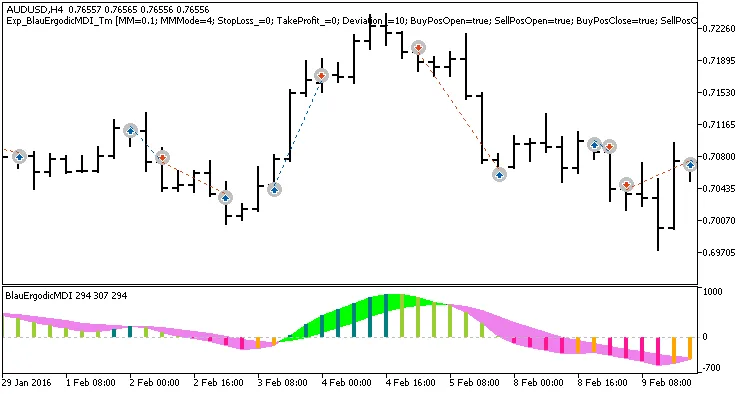
Fig. 1. Examples of deals on the chart
Here’s a look at the testing results for 2016 using the AUDUSD on an H4 timeframe:
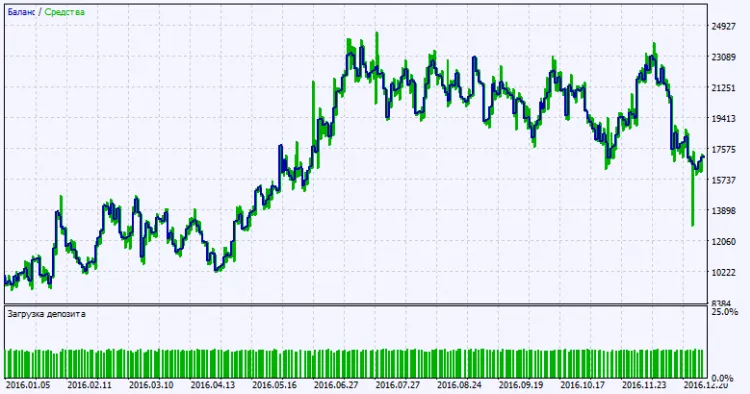
Fig. 2. Testing results chart




Comments 0