
Author of the idea:bobby, mq5 code author:barabashkakvn.
The 3MACross EA is a powerful trading tool designed for MetaTrader 5, utilizing two key indicators: MA Cross 3MACross Alert WarnSig and Price Channel.
When it comes to managing your trades, this EA offers three flexible options for setting your stop loss (SL) and take profit (TP):
- Trailing Stop: This is greater than zero. When activated, a traditional trailing stop function applies to your open positions.
- Auto SL/TP: Set to 'true'. This option automatically determines the SL and TP levels based on the Price Channel indicator.
- BreakEven: This is greater than zero. Once a position hits the specified BreakEven profit level, it automatically adjusts to the BreakEven point.
It's crucial to note that you can only select one of these three options at a time. For instance, if you set BreakEven to 15, then Trailing Stop must be set to zero and Auto SL/TP to false (these defaults apply in the EA settings).
Additionally, you have two choices for setting your position volume: a fixed lot size defined by Lots or a risk percentage based on your available margin Risk in percent for a deal from a free margin. You can only choose one; if Lots is set to zero or less, the EA will use the risk percentage method.
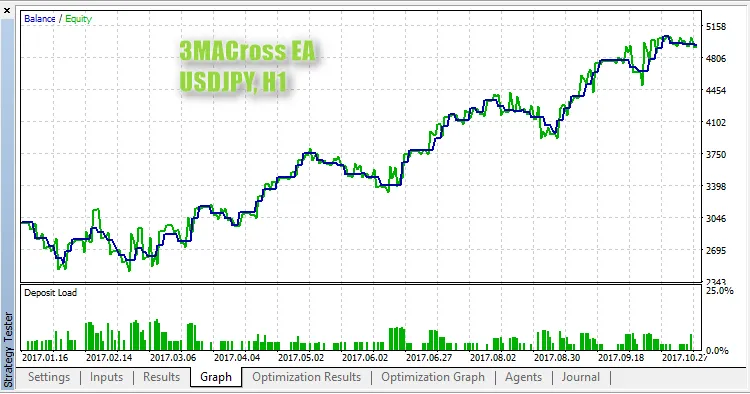
For optimal results, the EA is pre-optimized for USDJPY on the H1 timeframe, which are the default settings used in the EA:
Input Parameters
- Trade Parameters:
- Lots: (if use risk from free margin) - defines the position volume;
- Stop Loss: set your stop loss level;
- Take Profit: set your take profit level;
- Trailing Stop: set your trailing stop level;
- Risk: define risk per trade as a percentage of free margin;
- Auto SL/TP: enable stop loss and take profit based on the Price Channel indicator;
- Trade at Close Bar: if 'true', the EA will trade on the closed bar #1; if 'false', it will trade on the current bar #0;
- BreakEven: define your break-even point;
- Max Open Positions: set the maximum number of positions allowed in one direction.
- MA Cross 3MACross Alert WarnSig Indicator Parameters:
- First Moving Average Parameters:
- Period: specify the period of the first MA;
- Shift: set the shift for the first MA;
- Method: select the method for the first MA.
- Second Moving Average Parameters:
- Period: specify the period of the second MA;
- Shift: set the shift for the second MA;
- Method: select the method for the second MA.
- Third Moving Average Parameters:
- Period: specify the period of the third MA;
- Shift: set the shift for the third MA;
- Method: select the method for the third MA.
- First Moving Average Parameters:
- crossesOnCurrent:
- alertsOn:
- alertsMessage:
- alertsSound:
- alertsEmail:
- Price Channel Indicator Parameters:
- InpChannelPeriod: define the calculation period (number of bars).




Comments 0