
Author of the Idea:Collector, Code Developer:barabashkakvn.
Let’s dive into the rules of this trading system:
- Buy Signal: When the SAR on bar 1 is less than the Close of bar 0, and the SAR on bar 1 is less than the SAR on bar 0, with the RSI on bar 0 being greater than 50.0.
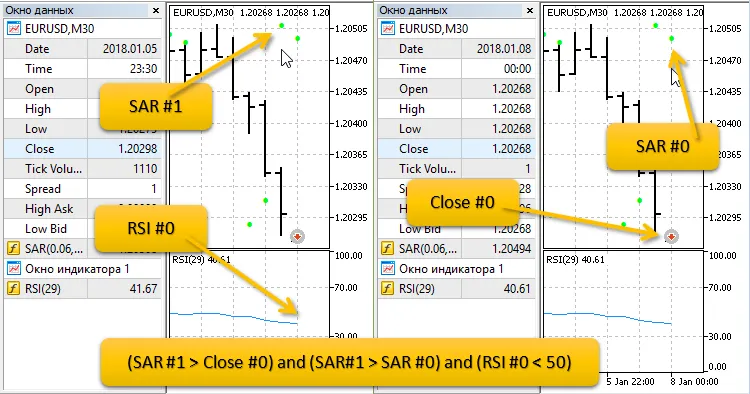
- Sell Signal: When the SAR on bar 1 is greater than the Close of bar 0, the SAR on bar 1 is greater than the SAR on bar 0, and the RSI on bar 0 is less than 50.0.
The lot size is automatically calculated based on the risk percentage of your free margin.
Here’s what you need to know to open a Sell position:
Input Parameters
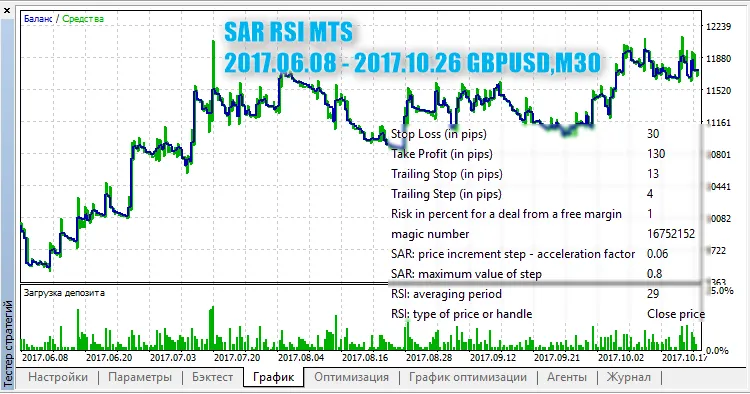
- Stop Loss (in pips): Set your Stop Loss value.
- Take Profit (in pips): Define your Take Profit level.
- Trailing Stop (in pips): Set your trailing stop distance.
- Trailing Step (in pips): Determine the step for the trailing stop.
- Risk Percentage: Choose the risk per trade as a percentage of your free margin.
- Magic Number: Assign a unique identifier for your EA.
- SAR: Price Increment Step: Set the acceleration factor for the SAR indicator.
- SAR: Maximum Step Value: Define the maximum step value for the SAR indicator.
- RSI: Averaging Period: Determine the averaging period for the RSI indicator.
- RSI: Price Type: Select the type of price for the RSI indicator.
Check out this example for SAR RSI MTS from June 8, 2017, to October 26, 2017, on GBPUSD, M30:




Comments 0