
If you’re looking to enhance your trading strategy on MetaTrader 5, you might want to check out the BrainTrend2 and AbsolutelyNoLagLWMA. These two brilliant indicators are combined into one efficient Expert Advisor (EA) that will help you identify trading opportunities.
The EA generates signals for entering trades at the close of a bar, specifically when a trend reversal occurs. You’ll easily spot these shifts by observing the color changes in the indicators.
To ensure the EA functions correctly, make sure you’ve placed the compiled indicator files, BrainTrend2_V2.ex5 and AbsolutelyNoLagLwma.ex5, in your <terminal_data_directory>\MQL5\Indicators folder.
For the tests showcased below, we utilized the default EA inputs. Please note that we didn’t implement Stop Loss and Take Profit settings during testing.
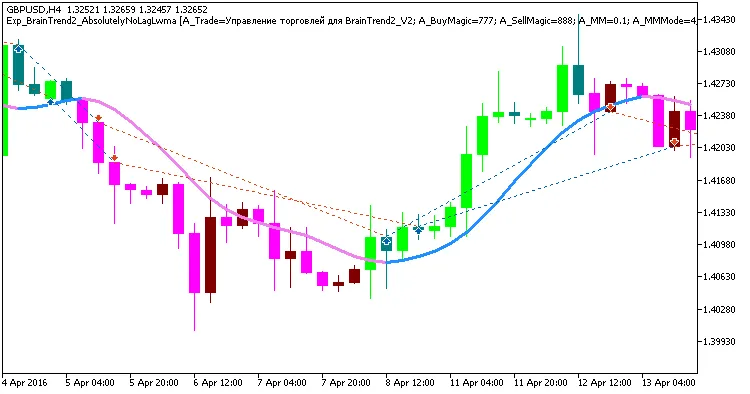
Fig 1. Exemplary trades in the chart
Here’s a look at the testing results for GBPUSD on the H4 timeframe throughout 2016:
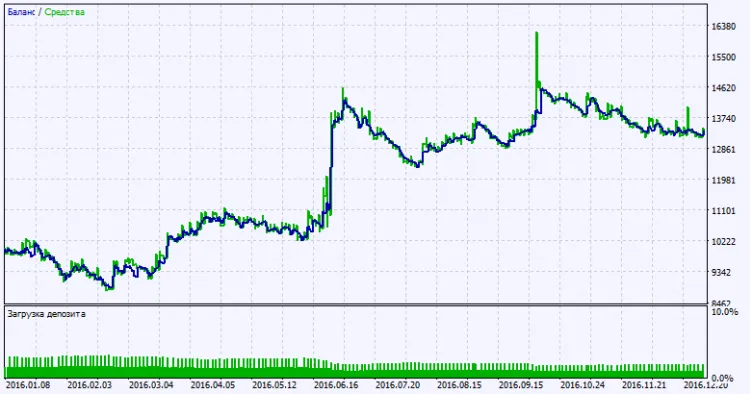
Fig. 2. Testing results chart




Comments 0