
Hey fellow traders! If you're looking to streamline your trading process on MetaTrader 4, then let me introduce you to LineOrder. This nifty tool allows you to place orders quickly using horizontal lines right from your chart. Let's dive into how it works!
Getting Started with LineOrder
With LineOrder, you can easily control your stop loss and take profit levels just by moving those horizontal lines around. For instance, if you're ready to buy EUR/USD, all you need to do is drag and drop a horizontal line onto your EUR/USD chart. It's that simple!
Here's how to set it up:
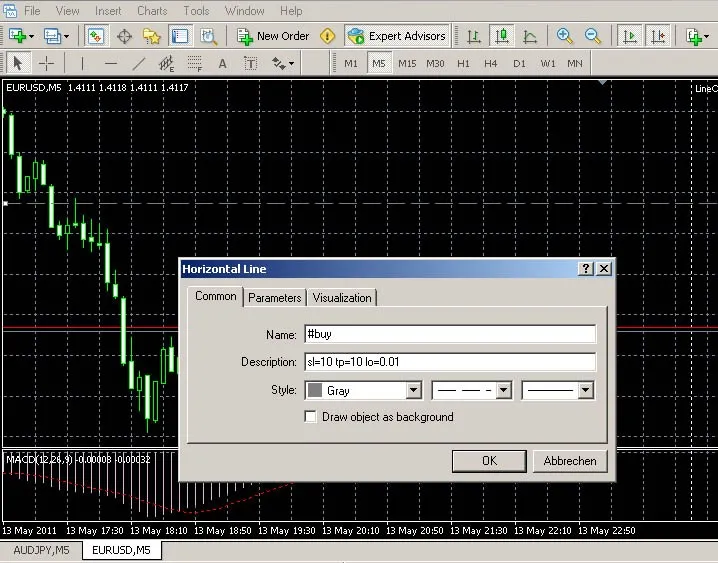
- Double-click on the horizontal line you just placed.
- In the common tab, change the name to
#buyand hit the OK button.
If double-clicking doesn’t work for you, just head over to Tools -> Options -> Objects and make sure you’ve ticked the option to select objects with a single mouse click.
Closing Orders Made Easy
Want to close an order? Simply remove the horizontal order line! It's as straightforward as that.
You can also customize your trades by adding details like stop-loss, take-profit, lot size, and trailing stop right in the description field. For example, if you want a 20-pip stop-loss and a 10-pip take-profit, just type this into the description: sl=20 tp=10. Make sure to use spaces to separate your options. Check out the visual guide below:
Command Options
Here are some quick commands you can use in the name field:
#buy- For a buy order#sell- For a sell order#selltp- Sell order with take profit at the line#sellsl- Sell order with stop loss at the line#buytp- Buy order with take profit at the line#buysl- Buy order with stop loss at the line
Additional Options
Don't forget about these options you can set in the description field:
ts- Trailing stop in pipssl- Stop loss in pipstp- Take profit in pipssq- Stop loss at a specific pricetq- Take profit at a specific pricelo- Lot size
To disable an active trailing stop, just click on the horizontal order line and type ts=-1 in the description field.
Ready to Elevate Your Trading?
With LineOrder, managing your trades becomes a breeze. So go ahead, give it a try and see how it can enhance your trading experience on MetaTrader 4. Happy trading!




Comments 0