
Exciting Update: Version 1.2 is Here! (After a long wait...)
Let’s be real: trading manually during news events is a risky game. The emotional roller coaster of navigating volatile markets can lead to poor decisions. That’s why having an EA (Expert Advisor) is a game-changer. Set up your EA, preferably on a VPS, and let it do the heavy lifting while you check in later for the results. Just a heads-up: this EA is designed for educational purposes and isn’t aimed at beginners or casual traders. It’s crucial that you run thorough tests using the strategy tester to ensure it meets your trading style and needs.
When testing this EA, stick to a demo account or use small lot sizes with low leverage on a real account. I must stress that this EA may not fit everyone’s trading approach. During our tests, it performed well in the strategy tester, but it requires numerous adjustments to adapt to real market conditions. So, consider your options carefully before deploying it on a live account—consider this your warning!
Forex brokers are well aware that many traders aim to capitalize on news spikes, and they often adjust their systems to take advantage of this. If you’re not using an ECN or NDD account, employing this EA during key news events might backfire, as brokers can implement tactics that work against you.
This EA sets up BUY Stop and SELL Stop pending orders on the next opening candle, deleting one of the pending orders once a trade is triggered (One Cancels Other - OCO). It tracks candle movements for each tick, strategically placing BUY STOP and SELL STOP orders. It’s best to use a small timeframe, like 1M to 5M, for optimal performance.
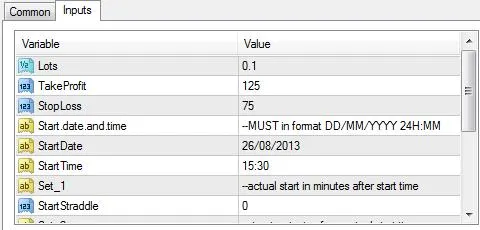
You can customize the EA’s settings, and there are clear explanations for each option, so make sure to read them thoroughly before setting it up:
- Distance: Set the pips distance for the BUY/SELL stop from the current open price.
- Expiration: Choose how many minutes after placing a BUY/SELL stop the order will expire if it’s not triggered.
Keep in mind that the EA operates based on server time, so you’ll need to factor in the time difference from your local time or refer to Forex Factory Events to ensure your timings align correctly.
As always, use this EA at your own risk—there are no guarantees in trading. Good luck!
Want to see it in action? Check out this video: http://youtu.be/gMG12RsMKmo




Comments 0