
Vantaggi
- La funzione più pesante è iBarShift, che sostituisce tutti i cicli nel codice necessari per il recupero dei picchi.
- Tutte le informazioni necessarie per costruire il ZigZag per ogni barra sono accessibili in qualsiasi momento e anche per ogni codice esterno.
- Nessun picco sospeso.
- È disponibile un metodo efficiente per trovare i picchi.
- Estremamente veloce.
- Funziona correttamente con le inserzioni storiche e quando si cambia timeframe.
- Perfetto per l'uso in sistemi di trading (EA).
Svantaggi
1. Requisiti di memoria. Questo indicatore utilizza 5 buffer invece di 2 (o addirittura 1) come in altre implementazioni simili. Tuttavia, a mio avviso, questo è un buon prezzo da pagare per i vantaggi #6 e #7. Nessun ZigZag veloce che ho visto può elaborare le inserzioni storiche senza una ricostruzione completa. Il mio lo fa in modo efficiente.
2. Linee aggiuntive disponibili. Queste sono necessarie per rendere i dati visibili per qualsiasi codice esterno, ma queste linee non dovrebbero mai essere visibili.
Principio:
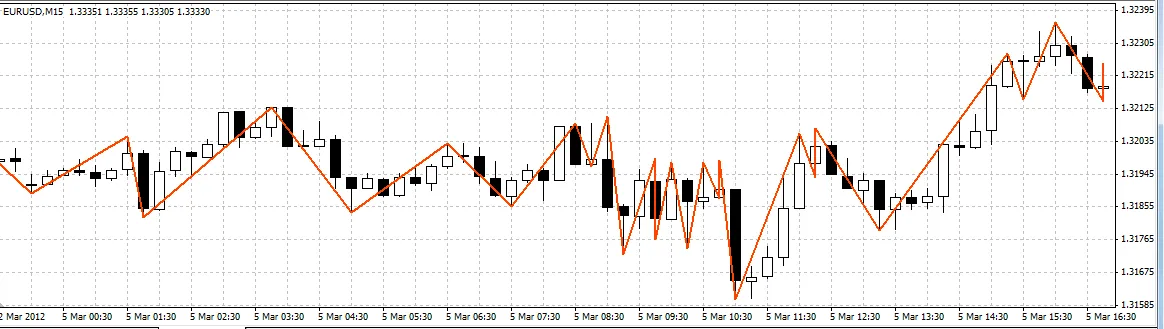
Il ZigZag è tracciato secondo il principio di canalizzazione.
La larghezza del canale può essere definita in Punti (XLab_ZZ) o in Percentuale (XLab_ZZP).
Recupero dei Picchi:
externint ChannelWidth = 100;

#property indicator_chart_window#property indicator_buffers 1#property indicator_color1 Red#property indicator_width1 3datetime LastTime;

int init()
{
   LastTime = 0;

   return(0);
}

bool GetValue(double dir, int bar, int prevBar, double& peak, int& peakBar, datetime& peakTime)
{
   if (dir < 0)
   {
      datetime t = iCustom(Symbol(), 0, "XLab_ZZ", ChannelWidth, 2, bar);
      int i = iBarShift(Symbol(), 0, t);

      if (i == prevBar)
      {
         t = iCustom(Symbol(), 0, "XLab_ZZ", ChannelWidth, 2, bar + 1);
         i = iBarShift(Symbol(), 0, t);
      }

      double v = iCustom(Symbol(), 0, "XLab_ZZ", ChannelWidth, 1, i);

      if (v == EMPTY_VALUE)
      {
         t = iCustom(Symbol(), 0, "XLab_ZZ", ChannelWidth, 2, bar + 1);
         i = iBarShift(Symbol(), 0, t);
         v = iCustom(Symbol(), 0, "XLab_ZZ", ChannelWidth, 1, i);
      }

      peak = v;
      peakBar = i;
      peakTime = t;
   }
   elseif (dir > 0)
   {
      t = iCustom(Symbol(), 0, "XLab_ZZ", ChannelWidth, 3, bar);
      i = iBarShift(Symbol(), 0, t);

      if (i == prevBar)
      {
         t = iCustom(Symbol(), 0, "XLab_ZZ", ChannelWidth, 3, bar + 1);
         i = iBarShift(Symbol(), 0, t);
      }

      v = iCustom(Symbol(), 0, "XLab_ZZ", ChannelWidth, 0, i);

      if (v == EMPTY_VALUE)
      {
         t = iCustom(Symbol(), 0, "XLab_ZZ", ChannelWidth, 3, bar + 1);
         i = iBarShift(Symbol(), 0, t);
         v = iCustom(Symbol(), 0, "XLab_ZZ", ChannelWidth, 0, i);
      }

      peak = v;
      peakBar = i;
      peakTime = t;
   }
   else
   {
      return (false);
   }

   return (true);
}

int start()
{
   if (LastTime == Time[0]) return (0);
   LastTime = Time[0];

   double dir = iCustom(Symbol(), 0, "XLab_ZZ", ChannelWidth, 4, 1);
   double rdir = -dir;

   if (dir == EMPTY_VALUE) return (0);

   double v1, v2, v3, v4, v5;
   int    i1, i2, i3, i4, i5;
   datetime t1, t2, t3, t4, t5;

   GetValue(dir, 1, 0, v1, i1, t1);
   GetValue(rdir, i1, 0, v2, i2, t2);
   GetValue(dir, i2, i1, v3, i3, t3);
   GetValue(rdir, i3, i2, v4, i4, t4);
   GetValue(dir, i4, i3, v5, i5, t5);

   SetPt("1", v1, t1);
   SetPt("2", v2, t2);
   SetPt("3", v3, t3);
   SetPt("4", v4, t4);
   SetPt("5", v5, t5);

   Print(v1, "   ", v2, "  ", v3, "  ", v4, " ", v5, " ", i1, "  ", i2, "  ", i3, " ", i4, " ", i5);

   return(0);
}

void SetPt(string name, double price, datetime time)
{
   ObjectCreate(name, OBJ_ARROW, 0, time, price);
   ObjectSet(name, OBJPROP_ARROWCODE, 108);
   ObjectSet(name, OBJPROP_PRICE1, price);
   ObjectSet(name, OBJPROP_TIME1, time);
}
Questo esempio è un indicatore che marca (una volta per barra) i primi cinque picchi (incluso quello attualmente in formazione).
Attenzione! Questo codice può funzionare in modo errato se la modalità 0th Bar è attivata.
Modalità 0th Bar:
È impostata con la variabile DrawZeroBar. Disattivata per impostazione predefinita.
Non è consigliato utilizzare questa opzione, specialmente se l'indicatore è utilizzato in un EA.
Divertiti a usarlo! ;) Non esitare a fare domande.
Se trovi bug, per favore segnalamelo. Grazie.




Commento 0