
Hey fellow traders! I recently stumbled upon an issue with a free indicator for MetaTrader 4 that I used to rely on. Unfortunately, it seems the original creator has removed it. If you’re in the same boat, don’t worry—I’ve got a workaround!
After some tinkering, I decided to create my own indicator for MetaTrader 5, and I’m excited to share it with you. This VPS Monitor will help you keep tabs on your trading strategies seamlessly.
To get started, simply load the indicator onto any chart you choose. You’ll need to set up the Periodic Hour and Message parameters. Once you’ve done that, it’ll send you notifications or emails directly to your MetaTrader mobile app after the specified period.
Here’s how to set it up:
- Go to Tools in the menu, then select Options.
- Navigate to the Notifications (and Email) tab.
- Here, you’ll need to input your MetaQuotes ID. You can find this in your MetaTrader mobile app under the Chat menu at the bottom.
Check out these screenshots for a visual guide:
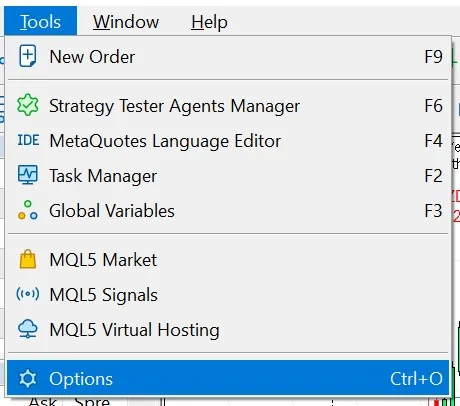
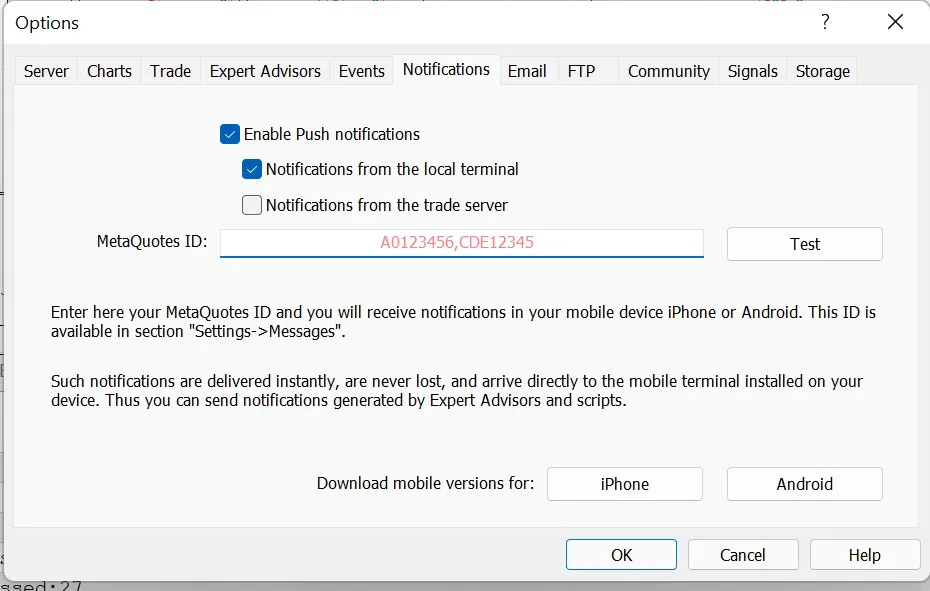
Now you’re all set! With this VPS Monitor, you can stay connected and ensure you’re always in the loop with your trades. Happy trading!




Comments 0