
Hey traders! Today, I'm excited to introduce you to the latest version of the Madeleine indicator, aptly named Madeleine_v2.0. This tool can be a game-changer in your trading arsenal, helping you analyze market trends with precision.
Input Parameters Breakdown
Here’s a quick overview of the key parameters you’ll be working with:
- str: The name of the indicator, which is set as "Madeleine_v2.0".
- _Bars: This lets you specify the number of bars to be drawn on your chart.
- cfg_Bars: Default is 18, meaning 18 bars will be visualized.
- Ray: A setting for rays drawing, which can be toggled on or off.
- cfg_Ray: Set to false by default, which means rays won’t be drawn unless you change this.
- HL1: This option allows you to draw based on High (315) and Low (45).
- cfg_HL1: Default is true, so it will draw using High (315) and Low (45).
- OC1: This parameter focuses on Open (315) and Close (45).
- cfg_OC1: Set to false by default, meaning this won't be activated unless specified.
- HL2: Similar to HL1 but uses High (45) and Low (315).
- cfg_HL2: Default is set to false.
- OC2: This is for Open (45) and Close (315).
- cfg_OC2: Also set to false by default.
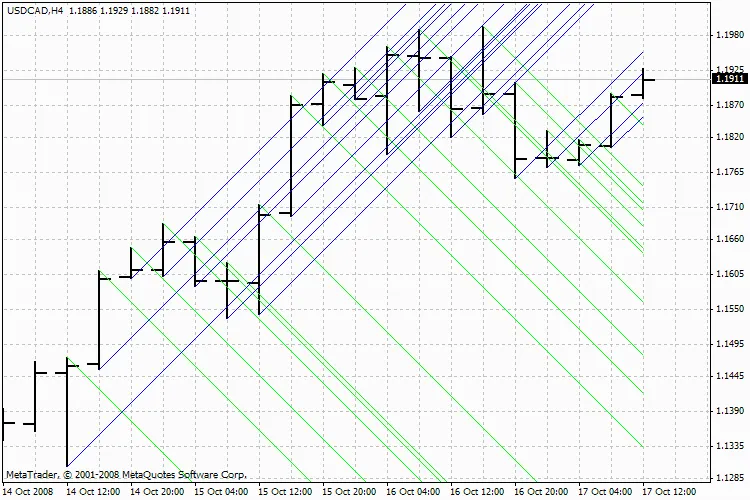
Madeleine_v2.0
Feel free to adjust these parameters to suit your trading style. Understanding how to leverage the Madeleine_v2.0 indicator can lead to better decision-making and improved trading outcomes. Happy trading!
Related Posts
- Unlocking MetaCOT 2: Your Ultimate CFTC Indicator Toolkit for MT4
- Mastering TrendLineAlert_V2: Your Go-To Indicator for MetaTrader 5
- Mastering PriceAlert_V2 for MetaTrader 5: Your Go-To Indicator for Trading Alerts
- Mastering the Open Range Breakout Indicator for MetaTrader 5
- Unlocking the FiboPiv_v2 Indicator for Better Trading Decisions