
Hey there, traders! Today, we're diving into the UltraXMA indicator, designed specifically for MetaTrader 5. This nifty tool is built on the integral value of trends using a fan of moving averages with an arithmetic progression for the smoothing period.
So, how does it work? The calculation algorithm for the moving averages involves a few input parameters:
- StartLength - This is the minimum initial value for the first signal line;
- Step - The period change step;
- StepsTotal - The total number of period changes.
To calculate any period value from the fan of lines, we use the following arithmetic progression:
XMAPeriod(Number) = StartLength + Number * Step
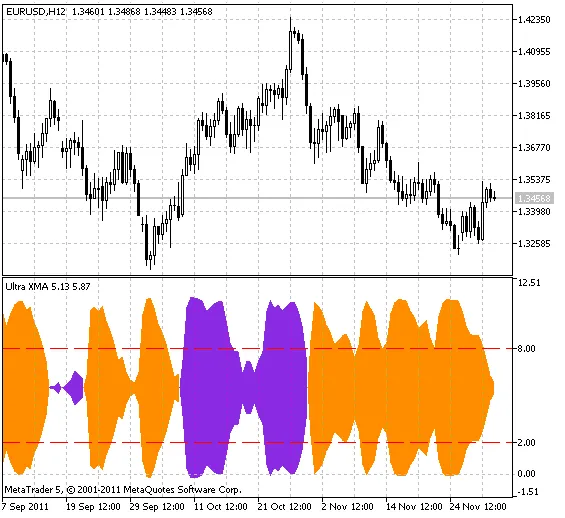
Here, the Number variable ranges from zero to StepsTotal. The calculated values of the periods are stored in an array and utilized at each tick to derive the XMA moving averages fan values. The current trend direction for each smoothing is assessed, along with the count of positive and negative trends across the entire array of moving averages. The final tally of these trends is then smoothed and displayed as indicator lines, forming a color cloud with the DRAW_FILLING style class.
The color of the cloud indicates the trend direction, while the width of the cloud signifies its strength. You can also set overbought (UpLevel) and oversold (DnLevel) levels as a percentage of the indicator's maximum amplitude.
When it comes to smoothing algorithms, you have a choice of ten different methods:
- SMA - Simple Moving Average;
- EMA - Exponential Moving Average;
- SMMA - Smoothed Moving Average;
- LWMA - Linear Weighted Moving Average;
- JJMA - JMA Adaptive Average;
- JurX - Ultralinear Smoothing;
- ParMA - Parabolic Smoothing;
- T3 - Tillson's Multiple Exponential Smoothing;
- VIDYA - Smoothing using Tushar Chande's algorithm;
- AMA - Smoothing with Perry Kaufman's algorithm.
It's worth noting that the phase parameters differ significantly across various smoothing algorithms. For instance, the JMA uses an external phase variable ranging from -100 to +100. T3 adjusts a smoothing ratio multiplied by 100 for better visualization, while VIDYA relies on the CMO oscillator period. For AMA, the slow EMA period is fixed at 2 by default.
To use this indicator, you’ll need the SmoothAlgorithms.mqh library classes, which should be copied to your terminal's data folder under MQL5/Include. For more on how to utilize these classes, check out the article "Averaging Price Series for Intermediate Calculations Without Using Additional Buffers".
Here are the input parameters for the indicator:
//+----------------------------------------------+//| Indicator input parameters |//+----------------------------------------------+inputENUM_APPLIED_PRICE Applied_price=PRICE_CLOSE; // Applied price//----input Smooth_Method W_Method=MODE_JJMA; // Smoothing methodinputint StartLength=3; // Initial smoothing period inputint WPhase=100; // Smoothing parameter//---- inputuint Step=5; // Period change stepinputuint StepsTotal=10; // Number of period changes//----input Smooth_Method SmoothMethod=MODE_JJMA; // Smoothing methodinputint SmoothLength=3; // Smoothing depth inputint SmoothPhase=100; // Smoothing parameterinputuint UpLevel=80; // Overbought levelinputuint DnLevel=20; // Oversold levelinputcolor UpLevelsColor=Red; // Overbought level colorinputcolor DnLevelsColor=Red; // Oversold level colorinputSTYLE Levelstyle=DASH_; // Levels styleinputWIDTH LevelsWidth=Width_1; // Levels width




Comments 0