
If you’re looking to dive deeper into trading data, the SeriesIntegerInfo and CopyRates utility is just the tool you need. While it’s not a trading signal generator, it provides valuable insights into the number of bars that have terminal data, helping you make informed decisions.
This utility harnesses the power of the SeriesIntegerInfo and CopyRates functions to display crucial information about the availability of bar data from your trading terminal.
Key Features of the Utility
The beauty of this utility lies in its flexibility. You can use the current chart symbol (the default setting) or enter any symbol from your market watch. It generates a column displaying three key pieces of information returned by the SeriesIntegerInfo function across different timeframes for the selected symbol:
- SERIES_SYNCHRONIZED: Indicates if the terminal data is synchronized (the display will show SYNC or UN_SYNC based on this).
- SERIES_BARS_COUNT: Shows the total number of bars available in that timeframe, including bar zero.
- SERIES_FIRSTDATE: The date of the oldest bar in that timeframe.
Additionally, the utility provides a second column showcasing CopyRates information for any valid bar in each timeframe. By default, it displays the CopyRates information for the oldest bar in each timeframe (as indicated by SERIES_BARS_COUNT), but you also have the option to input any valid bar number you wish.
This tool acts as a companion to the previous indicator, which retrieves valid bar data through the 'Bars' function. Although the SeriesIntegerInfo function seems to provide a more efficient method for obtaining bar information, both indicators may encounter bars that CopyRates cannot access, at least with the current terminal version.
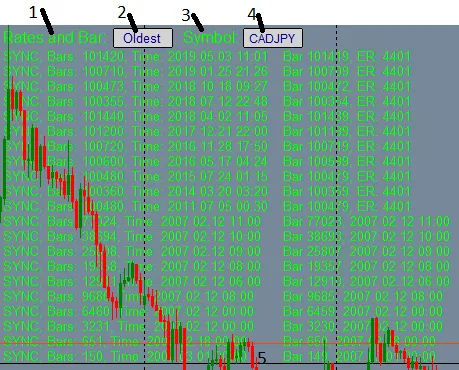
Understanding the Controls
Here’s a breakdown of the controls available in the utility:
- Rates and Bar: Click and drag to reposition the display anywhere on your chart.
- Bar Number Input Box: Enter a specific bar number to check if CopyRates information is available for that bar.
- Symbol Toggle: Click to switch between the default 'Oldest' bar number or the last entered bar number.
- Symbol Input Box: Type in any symbol from your Market Watch to display its information.
- MN1 CopyRates Toggle: Click to enable or disable logging of errors returned from Bars and CopyRates.
For the best experience, I recommend uncommenting the following line:
// #include <errordescription.mqh> // You can find errordescription.mqh here: https://www.mql5.com/en/code/79
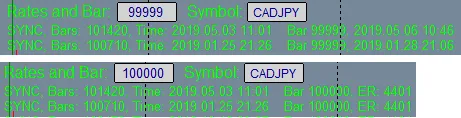
During my testing, I noticed that SeriesIntegerInfo could report bar values exceeding 100,000, but CopyRates seems to cap data retrieval at 99,999. The image below illustrates the CopyRates error for bar 100,000 versus the successful retrieval for bar 99,999:
Versions: The row identifiers M1 through MN1 were omitted in V1.00 but have been corrected in V1.02.




Comments 0