
If you're diving into the world of trading with MetaTrader 5, you'll want to check out the XMA_BB_Pivot_HTF indicator. This handy tool features two colored rectangles that display channel levels, providing you with a visual representation of the Bollinger channel values right on your chart—no matter the timeframe you’re trading on.
Indicator Input Parameters:
//+----------------------------------------------+//| Indicator input parameters                   |//+----------------------------------------------+ inputENUM_TIMEFRAMES TimeFrame=PERIOD_H4;// Chart periodinput Smooth_Method XMA_Method=MODE_SMA_; // Averaging methodinputuint XLength=100; // Depth of averaginginputint XPhase=15; // First averaging parameter//---- for JJMA within the range of -100 ... +100, it influences the quality of the transition process;//---- for VIDIA it is a CMO period, for AMA it is a slow average periodinputdouble BandsDeviation1=2.0; // Deviation 1inputdouble BandsDeviation2=4.0; // Deviation 2input Applied_price_ IPC=PRICE_CLOSE_;// Price constantinputint Shift=0; // Horizontal indicator shift in barsinputint PriceShift=0; // Vertical indicator shift in points//---- Colors of price labelsinputcolor Middle_color=clrBlue;
inputcolor Upper_color1=clrMediumSeaGreen;
inputcolor Lower_color1=clrRed;
inputcolor Upper_color2=clrDodgerBlue;
inputcolor Lower_color2=clrMagenta;
To use this indicator, you’ll need the XMA_BBx5_Cloud.mq5 file. Make sure to place it in your <terminal_data_folder>\MQL5\Indicators directory.
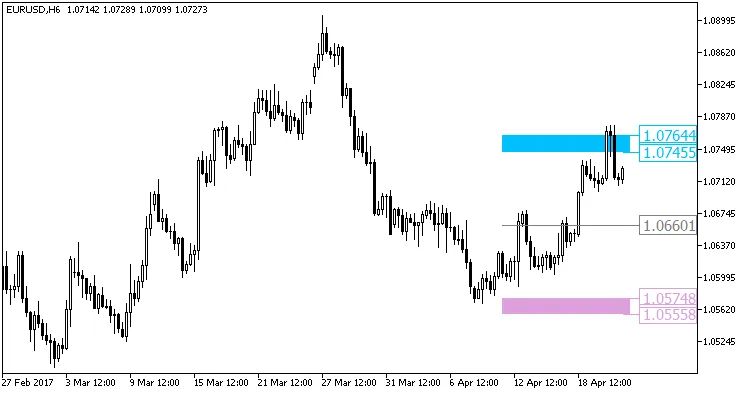
Fig1. The XMA_BB_Pivot_HTF indicator




Comments 0