
If you’ve been trading with MetaTrader 5, you know the standard iStochastic indicator can sometimes be a bit rigid. When called from your trading system, it defaults to showing the levels of 80.0 and 20.0. But what if you want to use different levels like 75.0 and 25.0? That’s where the Stochastic Custom indicator comes into play!
This customized version allows you to adjust the levels to better fit your trading strategy. We've made it easy to tweak the parameters without breaking a sweat. Here’s a quick look at how you can set it up:
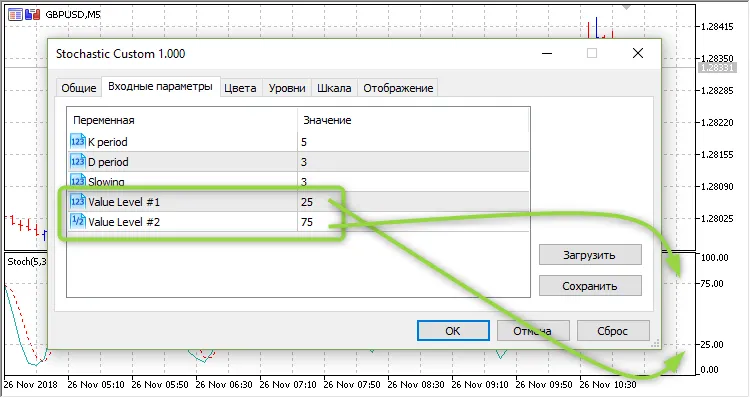
Here’s an example of how to call this indicator from your trading system:
***
inputint            Inp_STO_KPeriod= 5;        // STO: K periodinputint            Inp_STO_DPeriod= 3;        // STO: D periodinputint            Inp_STO_Slowing= 3;        // STO: Slowinginputint            Inp_STO_Level1 = 25.0;     // STO: Value Level #1inputdouble         Inp_STO_Level2 = 75.0;     // STO: Value Level #2
***
//--- create handle of the indicator iCustom
   handle_iStochastic=iCustom(m_symbol.Name(),Period(),"Stochastic Custom",
                              Inp_STO_KPeriod,Inp_STO_DPeriod,Inp_STO_Slowing,Inp_STO_Level1,Inp_STO_Level2);
//--- if the handle is not created
   if(handle_iStochastic==INVALID_HANDLE)
     {
      //--- tell about the failure and output the error code
      PrintFormat("Failed to create handle of the iCustom indicator for the symbol %s/%s, error code %d",
                  m_symbol.Name(),
                  EnumToString(Period()),
                  GetLastError());
      //--- the indicator is stopped early
      return(INIT_FAILED);
     }




Comments 0