
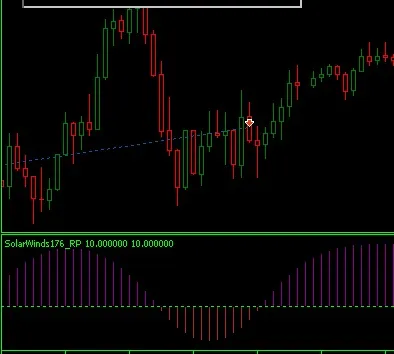
If you’re in the trading game, you’ve probably heard of the Solar Wind Indicator for MetaTrader 5. It’s recently gained some buzz, especially when paired with other indicators for pinpointing entry signals.
After a few requests for a revamped version, I took a closer look and discovered that it’s a classic re-painter. This version I’m sharing comes with a handy toggle to switch between re-paint and non-repaint modes, so you can see both in action.
Now, I know some might roll their eyes and say this isn’t worth much for actual trading. But think of this as a straightforward educational piece on the differences between re-painting and non-repainting indicators. Plus, it includes some useful coding techniques for creating indicators in MQ5.
The Solar Wind Indicator provides a smooth curve that helps you identify whether the trend is bullish or bearish.
If you're diving into this type of indicator, you might also want to explore the “Ehlers Fisher Transform” found in the code base.
Switching Modes:
You can easily toggle the indicator between re-painting and non-repainting modes with this user input:input ENUM_ON_OFF NRP = ENUM_OFF; // Non-Repainting (NPR) ON/OFF
Version 1.02 also introduces an option for using custom events and tidies up the plot definitions for better clarity.
Related Posts
- Unlocking MetaCOT 2: Your Ultimate CFTC Indicator Toolkit for MT4
- Unlocking the Power of Master Tools for MetaTrader 4
- Unlock Trading Insights with Volume Profile + Range v6.0 for MetaTrader 5
- Visualize Current Trends Across All Time Frames with This MetaTrader 4 Indicator
- Mastering the MACD Candle Indicator for MetaTrader 4