
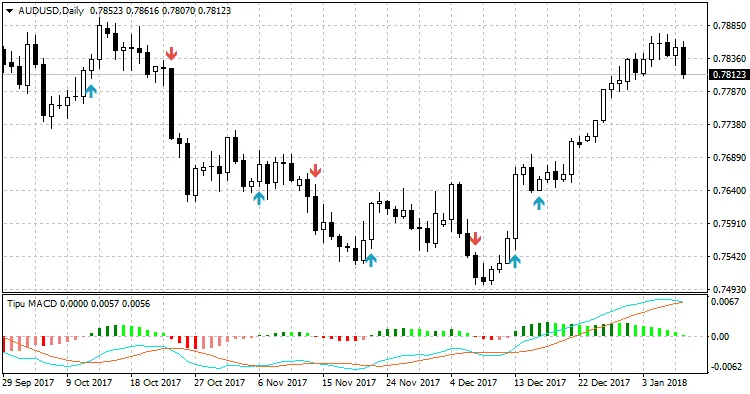
If you're a trader looking to enhance your trading strategies, the Tipu MACD is definitely worth your attention. This popular indicator, based on the MACD Oscillator developed by Gerald Appel back in the late 1970s, combines the best of both worlds: trend and momentum. It's one of the simplest tools out there, making it a favorite among traders. Want to dive deeper? You can read more about Tipu MACD here.
I've taken the original Tipu MACD code and made some tweaks. This version strips out the compatibility with the Tipu Panel, making it easier for anyone interested in developing a trading system with this indicator. It's a great learning resource, especially if you're venturing into creating your own Expert Advisor (EA).
Using Tipu MACD in Your Expert Advisor
Here's a quick example of how you can incorporate Tipu MACD into your EA:
int iSignal, // signals
iTrend; // trend

//--Method#1
iSignal = iCustom(_Symbol, _Period, "Tipu MACD", 2, 12, 26, 9, PRICE_CLOSE, "", 1, 5, clrBlue, clrRed, true, true, "", 1, false, false, false, 7, 0);

iTrend = iCustom(_Symbol, _Period, "Tipu MACD", 2, 12, 26, 9, PRICE_CLOSE, "", 1, 5, clrBlue, clrRed, true, true, "", 1, false, false, false, 8, 0);

if (iSignal == OP_BUY) // for sell use OP_SELL
{

}
if (iTrend == OP_BUY) // for sell use OP_SELL { } //--Method#2 bool BuySignal = iCustom(_Symbol, _Period, "Tipu MACD", 2, 12, 26, 9, PRICE_CLOSE, "", 1, 5, clrBlue, clrRed, true, true, "", 1, false, false, false, 9, 0);
bool SellSignal = iCustom(_Symbol, _Period, "Tipu MACD", 2, 12, 26, 9, PRICE_CLOSE, "", 1, 5, clrBlue, clrRed, true, true, "", 1, false, false, false, 10, 0);




Comments 0