
Introduction to the Fractal Indicator
If you're diving into the world of trading on MetaTrader 4, you've probably come across the Fractal Indicator. This tool, inspired by the trading genius Bill Williams, helps you spot local highs and lows in price action, which can be a game-changer for your trading strategy.
Support and Contribution
If you find the Fractal Indicator useful, consider showing your support by giving a star to its GitHub repository! Feel free to drop a comment below for any bug reports or suggestions for improvements. You can also contribute directly by making a pull request on GitHub.
Installation Guide
Ready to get started? Here’s how to install the Fractal Indicator:
- Launch MetaTrader and navigate to your data folder by clicking on File >Open Data Folder.
- Copy Fractal-Utilities.mqh into the MQL4\Include folder.
- Place Fractal-STF.mq4 and Fractal-MTF.mq4 into the MQL4\Indicators folder.
- Use MetaEditor to compile Fractal-STF.mq4 and Fractal-MTF.mq4, which will generate the .ex4 files you need.
Just a tip: make sure both .mq4 files are in the same directory (like MQL4\Indicators\Developed) to ensure they work seamlessly. If you move the compiled files, you’ll need to recompile them in their new location.
Understanding the Terminology
In the trading world, terminology can be a bit tricky. Here’s a quick breakdown:
- STF: Single Time Frame - This indicator focuses on just one time frame.
- MTF: Multi Time Frame - This one considers several time frames for its calculations.
Generally, Fractal-STF is quicker since it requires fewer calculations. If you’re not heavily reliant on multiple time frames, sticking with Fractal-STF might be your best bet.
Description
The Fractal Indicator is designed to identify local extremes by comparing a candle's high or low with its neighboring candles. This helps traders pinpoint potential turning points in the market. Here are some benefits of using this indicator over the built-in version:
1. **Customizable Neighborhood Radius**: Unlike the default, where the radius is set to two, you can choose your neighborhood radius, allowing you to identify extremes of various degrees on your chart (as shown in Figure 1).
2. **Unique Symbols**: You can customize the shape of the symbols that indicate these extremes, making it easier to visualize different degrees of highs and lows.
3. **Dynamic Arrow Placement**: The indicator lets you adjust the vertical distance of arrows from the candle high/low to prevent overlapping. This feature adapts based on the chart scale, ensuring clarity in your analysis.
4. **Higher Time Frame Visibility**: View higher time frame fractals on lower time frames. For instance, set your indicator to D1 and view M15 bars that align with D1 fractals, enhancing your trading insights.
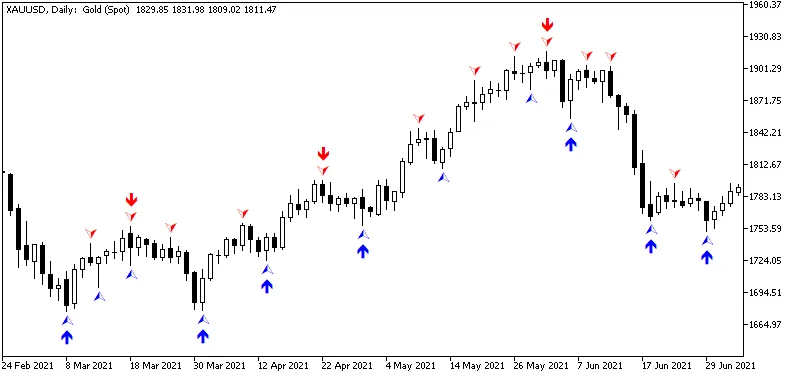
Figure 1. Fractals with neighborhood radius of 2 and 5.
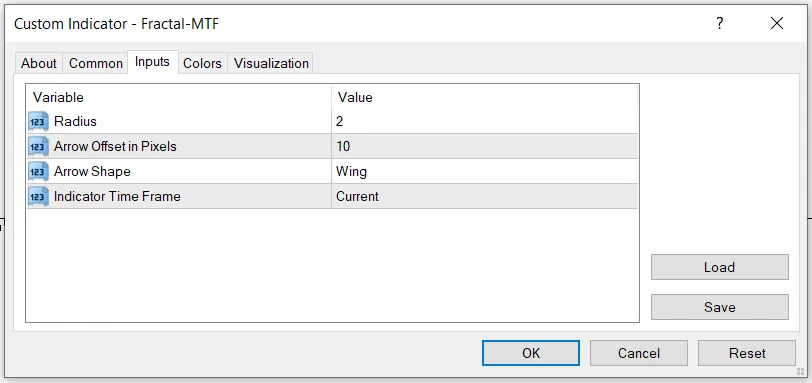
Figure 2. Inputs of the Fractal-MTF indicator.




Comments 0