
Hey traders! Today, let’s dive into a nifty utility that can enhance your trading experience on MetaTrader 5. This tool isn’t just another trading info utility; it’s specifically designed for those who are all about getting bar data through the Bars (or iBars) and CopyRates functions across multiple timeframes.
During my tests, I mainly used the 'Basket Viewer' tool. It allowed me to click through various symbols and see how the data displayed on the charts. This utility lets you use the current chart symbol by default or enter any symbol from your market watch to check how many bars are reported for each timeframe using the Bars function. Plus, you can see the results of the CopyRates function based on any bar number you input.
By default, it shows the CopyRates info for the oldest bar in each timeframe. If you’re curious about a more comprehensive way to obtain bar data, this utility acts as a companion to the twin indicator that utilizes the 'SeriesInfoInteger' function. While the SeriesInfoInteger function might be a bit better at fetching bar data, both tools report bars that CopyRates can’t access—at least with the current version of the terminal.
Check out the image below, which illustrates the typical startup of the indicator. Initially, you might see a bunch of "Terminal Data not Available" errors, but don’t worry; these will decrease as the terminal gathers the necessary data:
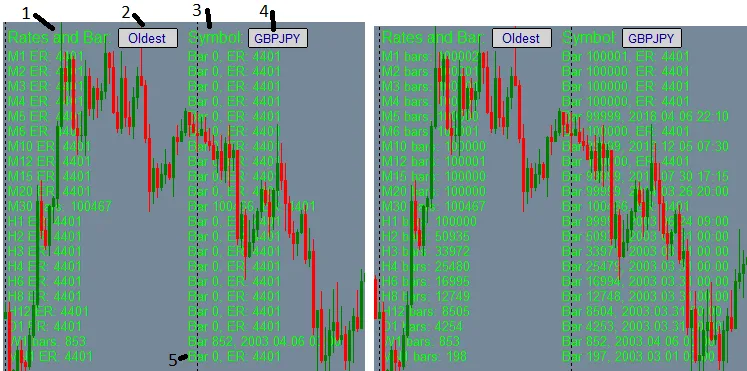
Now, let’s break down the controls:
- 1) Rates and Bar: Click and drag to reposition the display on your chart.
- 2) Bar Number Input Box: Enter a bar number here to check if CopyRates info is available for that specific bar.
- 3) Symbol Toggle: Click this to switch the Bar Number to the 'Oldest' default or the last entered bar number.
- 4) Symbol Input Box: Type in any symbol from your Market Watch to display its data.
- 5) MN1 CopyRates Toggle: Click here to turn logging on or off. When it's on, any errors from Bars and CopyRates will be logged.
I highly recommend uncommenting // #include <errordescription.mqh> // You can find errordescription.mqh at: this link. Adding this back into the indicator will give you more detailed error descriptions.
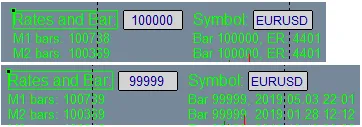
During my testing, I found that while Bars could report values exceeding 100,000, CopyRates seemed unable to fetch data for bar numbers over 99,999. Check out the image below that illustrates the CopyRates 4401 error for bar 100,000 compared to the success for bar 99,999:




Comments 0