
Hey fellow traders! If you’re looking to enhance your trading experience on MetaTrader 5, let’s dive into the i-OrdersMQL5 indicator. This nifty tool displays your deal history right on the chart, making it easier to analyze your trades. Got suggestions? They’re always welcome!
The chart elements are interactive, and you can tweak the colors to match your style through the indicator’s input parameters.
Input Parameters
Language
- Language - Choose your preferred language for messages. Currently, both English and Russian are available.
Display Settings
- ShowCurrentPostion - Set to true to display extra info about your current position.
- CompactPositionInfo - When true, it shows only profit information; set to false to see all available details.
- ShowDealHistory - Enable this to view your deal history.
Additional Settings
- StartTime - Define your starting time for trading.
- BuyColor - Customize the color for long trades.
- SellColor - Choose a color for short trades.
- InfoColor - Set a color for additional information.
- FontSize - Adjust the size of the text displayed.
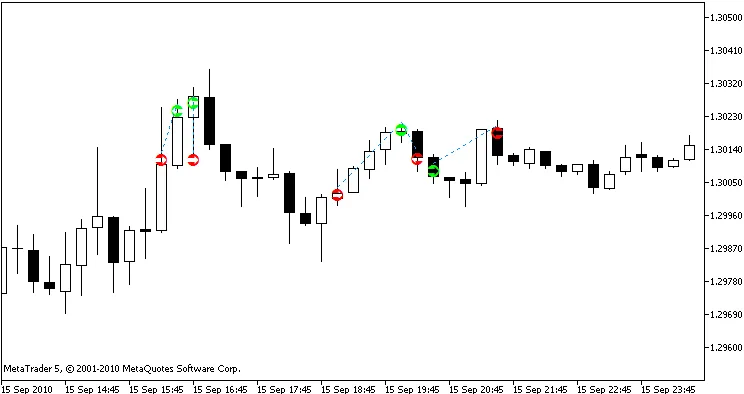
Let’s take a look at a couple of visuals to see how it all comes together:
Figure 1: Displaying Deal History
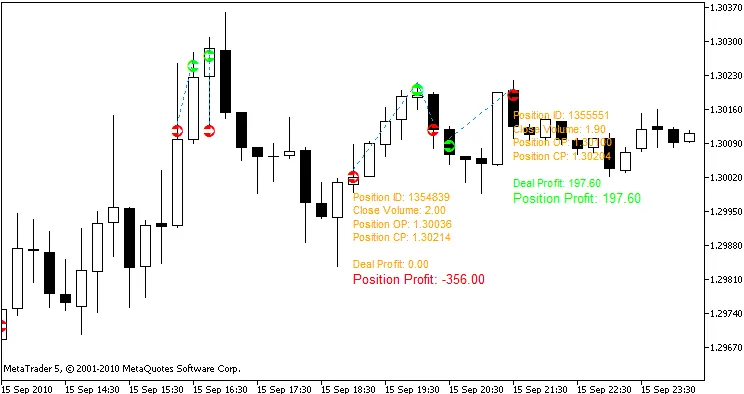
If you click on any arrow, you’ll get more detailed information. A second click hides it. Easy peasy!
Figure 2: Additional Information Display




Comments 0