
Hey fellow traders! If you're looking to enhance your trading game, let me introduce you to the Murrey Math Fixed Period Indicator. This handy tool displays Murrey levels right in your indicator buffers, complete with visual text info for easy reference. You can customize it to calculate levels based on your preferred timeframe.
Setting Up the Indicator
Getting started is a breeze! Here’s a quick rundown of the input parameters you can tweak:
- Timeframe: Set it to your desired timeframe, default is
PERIOD_D1(Daily). - Calculation Period: This determines how long the calculations run; the default is
64. - Step Back: Control how far back you want the indicator to look.
- Font Size: Adjust the size of the text displayed (default is
8). - Font Type: Choose your preferred font type, default is
Font7. - Label Surname: This sets the first part of the graphical object's names, default is
"Murrey_Math_Lv".
Important Setup Notes
Don’t forget to include the required library GetFontName.mqh. You’ll need to copy this to your terminal's MQL5/Include folder for everything to work smoothly.
Also, make sure the indicator file Murrey_Math_Lv.ex5 is placed in your terminal_directory/MQL5/Indicators folder.
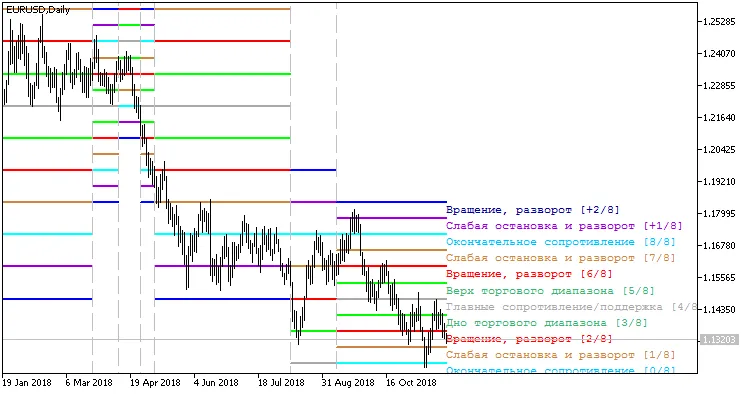
Fig. 1. Indicator MurreyMathFixPeriod_Lv




Comments 0