
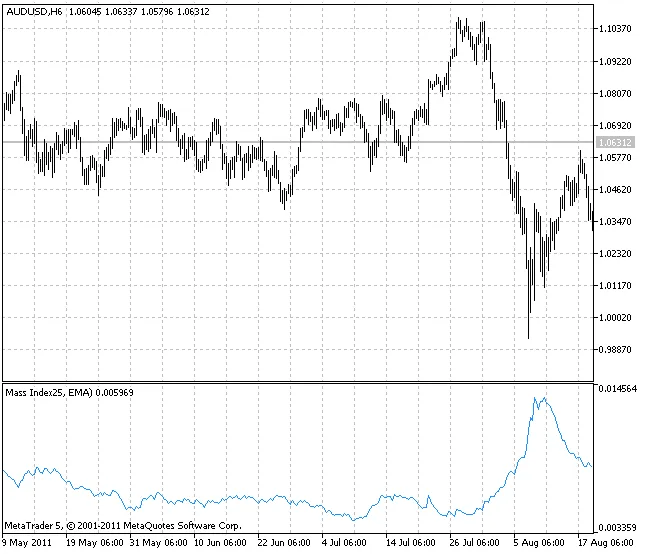
The Mass Index, brought into the spotlight by Tushar Chande and Donald Dorsey, is a handy tool for traders looking to spot potential trend reversals. This indicator works by summing the exponentially smoothed moving averages of high-low day ranges over the last 25 periods. Essentially, it measures how the average range between the highest and lowest prices is changing. When that range starts to widen, you'll see the Mass Index climb, and when it narrows, the index will drop.
To generate buy or sell signals, the Mass Index employs an exponential moving average, typically set to a period of 9. If the Mass Index indicates a potential reversal and the moving average shows a downtrend, it's a cue to open a long position. Conversely, if the moving average points to an uptrend, it might be time to go short.
One of the great things about the Mass Index is its flexibility. You can choose from ten different smoothing types:
- SMA - Simple Moving Average;
- EMA - Exponential Moving Average;
- SMMA - Smoothed Moving Average;
- LWMA - Linear Weighted Moving Average;
- JJMA - JMA Adaptive Average;
- JurX - Ultralinear Smoothing;
- ParMA - Parabolic Smoothing;
- T3 - Tillson's Multiple Exponential Smoothing;
- VIDYA - Smoothing using Tushar Chande's algorithm;
- AMA - Smoothing using Perry Kaufman's algorithm.
It's important to know that the phase-type parameters for different smoothing algorithms carry distinct meanings. For example, in JMA, it ranges from -100 to +100, while T3 uses a smoothing ratio multiplied by 100 for clarity. VIDYA employs a CMO oscillator period, and for AMA, the slow EMA period is crucial. In other algorithms, these parameters typically don’t affect the smoothing. For AMA, the fast EMA period is preset at 2, and the raising power ratio is also set to 2.
To get started with the Mass Index, you’ll need to have the SmoothAlgorithms.mqh library classes available in your terminal_data_folder/MQL5/Include. For a deep dive into using these classes, check out the article "Averaging Price Series for Intermediate Calculations Without Using Additional Buffers".
Related Posts
- Unlocking MetaCOT 2: Your Ultimate CFTC Indicator Toolkit for MT4
- Visualize Current Trends Across All Time Frames with This MetaTrader 4 Indicator
- Mastering the MACD Candle Indicator for MetaTrader 4
- Hourly Buffers for Data Collection in MetaTrader 5: A Simple Guide
- Unlocking the Power of Master Tools for MetaTrader 4