
Author: Rosh
Spearman's Rank Correlation is a handy, non-parametric method for analyzing the relationship between two variables. It's great for traders who want to understand how closely related different market factors are without getting bogged down by complex statistics.
How to Calculate Spearman's Rank Correlation
Here’s a quick rundown on how to calculate the Spearman's Rank Correlation:
- Assign a rank to each parameter in either ascending or descending order.
- Determine the differences in ranks for each pair of values you’re comparing.
- Square each of those differences and sum them all up.
- Calculate the correlation ratio using the formula shown below:

In this formula, the  symbol represents the sum of the ranks differences, while
  indicates the number of paired observations.
Interpreting the Correlation Ratio
When you use the rank correlation ratio, you can evaluate how closely the parameters are related:
- A ratio of 0.3 or lower indicates a weak correlation.
- Ratios between 0.4 and 0.7 show moderate correlation.
- Values of 0.7 or higher suggest a strong correlation.
It's worth noting that while Spearman's Rank Correlation is a bit less powerful than parametric correlation methods, it's particularly useful when you have a smaller dataset.
Versatility of the Spearman's Rank Correlation
This method isn’t just limited to quantitative data. It can also work with qualitative data that has varying intensities. For a deeper dive into the stats, check out this resource.
Using the Indicator in MetaTrader 5
In MetaTrader 5, the Spearman's Rank Correlation indicator functions as a smoother oscillator compared to the Stochastic indicator, without lagging at key reversal points.
The only external parameter you can tweak in the calculation is rangeN, which sets the number of bars for analysis. For example, if rangeN is set to 14, you’ll analyze the closing prices from Close[i] to Close[i + rangeN - 1] to create a sequence of ranks.
Additionally, the direction parameter allows you to sort the data in either descending (true) or ascending (false) order. True presents a more traditional view, while false gives you a mirrored perspective.
The CalculatedBars parameter limits how many bars are included in the calculation to save on CPU resources (though this might not always be a concern). Setting it to zero means it will use the entire available history. The Maxrange parameter, capped at 30, sets a maximum calculation period and can be a useful resource-saving measure for some traders.
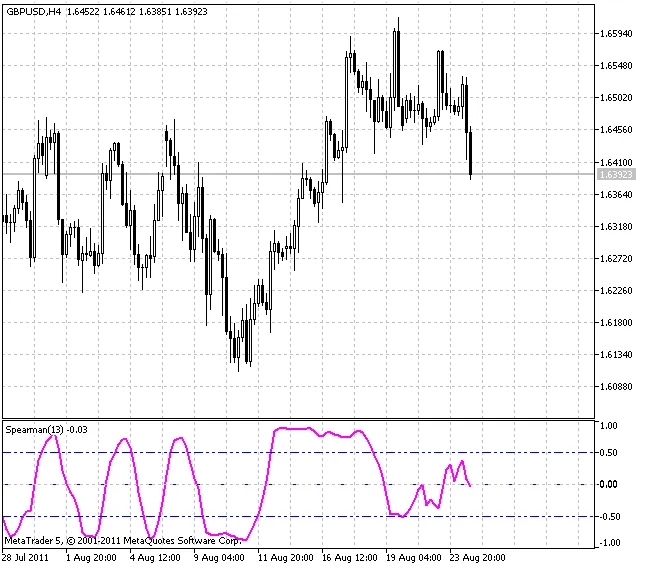
Spearman's Rank Correlation indicator




Comments 0