
Are you tired of paying high spreads while trading? Let me introduce you to SpreadMIN, a handy indicator designed for MetaTrader 4 that helps you keep an eye on the lowest spreads in real-time.
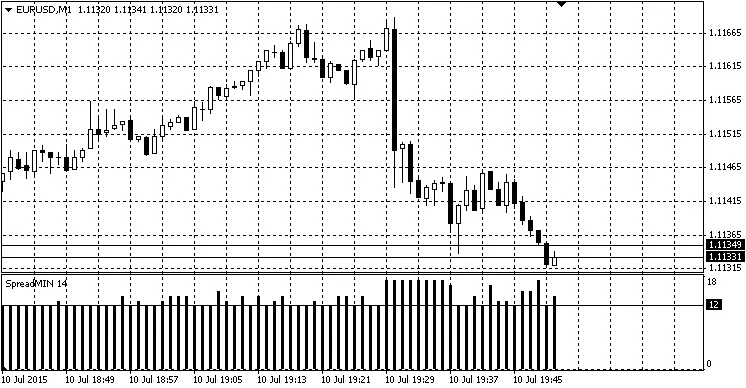
SpreadMIN displays a histogram of the minimum spread during the time the indicator is active. It's straightforward—no frills, just the essentials. For example, it includes scripts for executing buy or sell orders when the spread hits its lowest point.
This tool is similar to other spread monitoring indicators, but I aimed for simplicity. I just want to see the minimum spreads so I can make my trades at the best prices available.
You can set up a script to place trades automatically when the current spread is equal to or lower than the minimum spread of the previous candle. For optimal results, it's best to use this indicator on lower timeframes, because waiting for the minimum spread on higher timeframes can take ages.
Acknowledgments:
- getch
- Example Code 1
- Example Code 2
- And other similar resources.
Also, I stumbled upon an error description function which was quite helpful. Thanks to the community for sharing!
Recommendations:
- Ensure the indicator is active on your chart for at least a couple of candles before running the script.
- Utilize the appropriate script to execute trades when the current spread is at or below the minimum spread from the previous candle.
- Check out the example scripts for executing buy or sell orders.
Lastly, I know my code isn't perfect, so if you have any suggestions for improvements, I’d love to hear them. Thanks for reading!
Related Posts
- Unlocking the Power of Master Tools for MetaTrader 4
- How to Use the Change Chart Symbol Menu for MetaTrader 4
- Unlocking MetaCOT 2: Your Ultimate CFTC Indicator Toolkit for MT4
- MA Cross Alert Once: A Must-Have Indicator for MetaTrader 4
- Mastering Support and Resistance: Essential Indicator for MetaTrader 4