
開発者: DVYU inc.
Pivot_RSセッションインジケーターは、ピボットレベルを表示し、計算されたセッション中に特別な背景色を使用します。このインジケーターを使うことで、トレードの意思決定をより効果的に行うことができます。
インジケーターの入力パラメータ
//+----------------------------------------------+
//| インジケーターの入力パラメータ                   |
//+----------------------------------------------+
input Hour   StartHour=H08;              // セッション開始時間
input Min    StartMinute=M00;            // セッション開始分
input uint   SessionTime=400;            // セッション時間(分)
input color  Color_Session = clrPlum;    // セッションの色
input color  Color_Res = clrBlue;        // レジスタンスの色
input color  Color_R30 = clrGreen;       // レベルR30の色
input color  Color_R20 = clrGreen;       // レベルR20の色
input color  Color_R10 = clrGreen;       // レベルR10の色
input color    Color_P=clrDarkOrchid;    // レベルPの色
input color  Color_S10 = clrRed;         // レベルS10の色
input color  Color_S20 = clrRed;         // レベルS20の色
input color  Color_S30 = clrRed;         // レベルS30の色
input color  Color_Sup = clrMagenta;     // サポートの色
//---
input STYLE  Style_Res = SOLID_;         // サポートラインのスタイル
input STYLE  Style_R30 = SOLID_;         // レベルR30のラインスタイル
input STYLE  Style_R20 = SOLID_;         // レベルR20のラインスタイル
input STYLE  Style_R10 = SOLID_;         // レベルR10のラインスタイル
input STYLE    Style_P = DASH_;          // レベルPのラインスタイル
input STYLE  Style_S10 = SOLID_;         // レベルS10のラインスタイル
input STYLE  Style_S20 = SOLID_;         // レベルS20のラインスタイル
input STYLE  Style_S30 = SOLID_;         // レベルS30のラインスタイル
input STYLE  Style_Sup = SOLID_;         // レジスタンスラインのスタイル
//---
input Width  Width_Res = Width_2;        // レジスタンスラインの幅
input Width  Width_R30 = Width_1;        // レベルR30のライン幅
input Width  Width_R20 = Width_2;        // レベルR20のライン幅
input Width  Width_R10 = Width_3;        // レベルR10のライン幅
input Width    Width_P = Width_1;        // レベルPのライン幅
input Width  Width_S10 = Width_3;        // レベルS10のライン幅
input Width  Width_S20 = Width_2;        // レベルS20のライン幅
input Width  Width_S30 = Width_1;        // レベルS30のライン幅
input Width  Width_Sup = Width_2;        // サポートラインの幅
このインジケーターは、MQL4で初めて実装され、2008年1月30日にmql4.comのコードベースに公開されました。
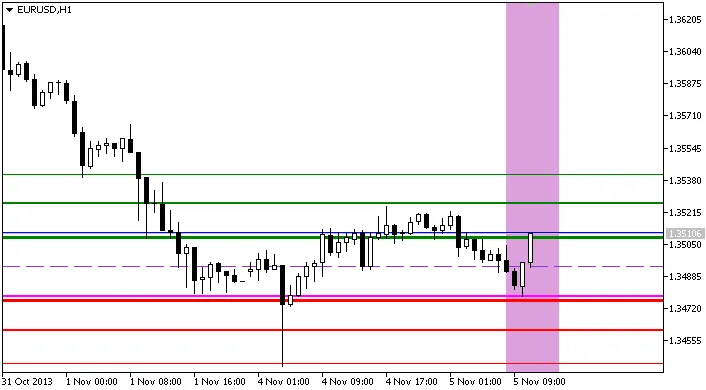
インジケーター Pivot_RS_session