
Note: A new update was released on March 30, 2020, which adds support for brokers that use various prefixes, infixes, or suffixes in their symbols. Scroll down for a detailed description.
Description
When we see that a currency pair like EUR/USD is trending upwards, it’s crucial to understand how much the Euro is strengthening while the US Dollar is weakening. Similarly, if CAD/JPY is in a downward trend, we need to assess how much the Canadian Dollar is losing strength versus the Japanese Yen.
A straightforward way to gauge the strengthening or weakening of currencies is by analyzing multiple currency pairs and tallying how often each currency plays a specific role in each pair. For instance, it’s beneficial to know how many instances CAD has strengthened across all pairs that include it.
Since there are numerous currencies trading in the market, it makes sense to focus on the eight major ones: USD, EUR, GBP, CHF, AUD, CAD, JPY, and NZD. This gives us 28 pairs to work with.
This indicator scans through all 28 pairs, identifies the strengthening and weakening currencies within each pair, and compiles the results. It essentially counts how often each currency is either strengthening or weakening and presents the data as follows:
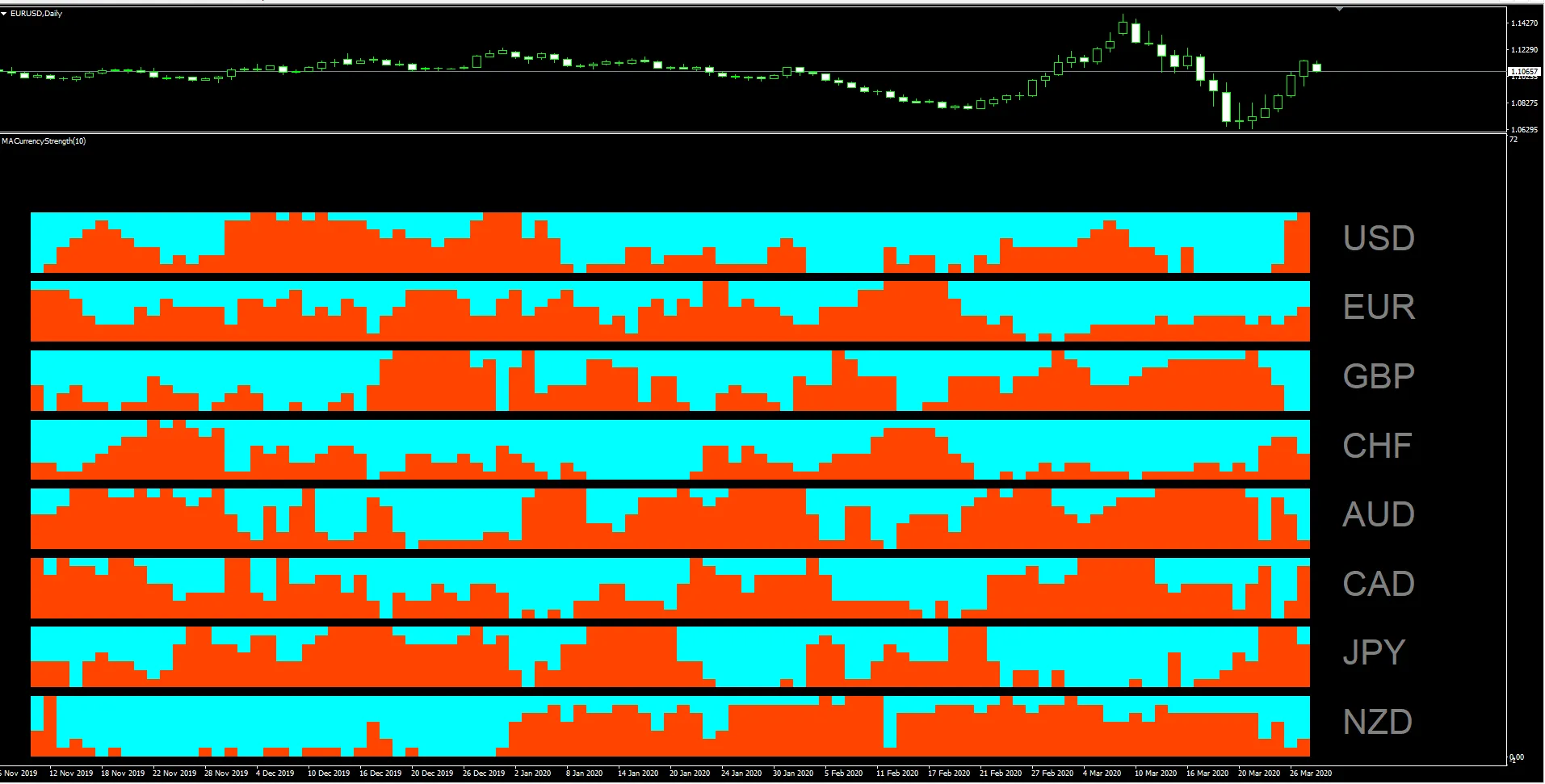
From the screenshot above, it’s clear that the USD is strengthening while the AUD is weakening, suggesting that the AUD/USD pair is likely heading south with considerable momentum!
This indicator is a fantastic tool that allows you to quickly identify which pairs deserve your attention at any given timeframe.
Inputs
The user-configurable inputs are as follows:
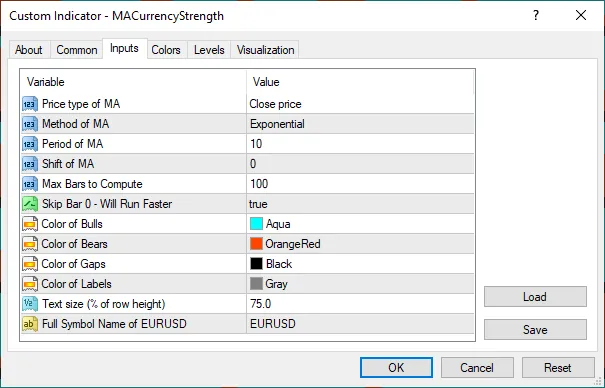
These inputs allow you to adjust the moving average properties. The indicator will compare the closing price of a candle with the moving average to determine the direction of the trend. The update from March 30, 2020, includes support for brokers that may prefix, infix, or postfix their symbols with additional characters like '+' or '.', as well as those using lowercase letters. All you need to do is enter the full symbol name for EUR/USD in the "Full Symbol Name of EURUSD" input parameter (as shown above), whether it’s "cEuRuSd." or "eUR_USd++", etc. (I’m just trying to cover all bases, lol), this new version should handle it.
To call this indicator from an EA, other indicators, or scripts, you can use the following function:
bool GetCSBuffer(int tf, int bar, string currency, int &numBulls, int &numBears)
{
    string name = "MACurrencyStrength";
    string Cs[] = { "USD", "EUR", "GBP", "CHF", "AUD", "CAD", "JPY", "NZD" };
    int numCs = ArraySize(Cs);
    for (int i=0; i<numCs; i++)
    {
        if (Cs[i]==currency)
        {
          numBulls = int(iCustom(Symbol(),tf,name,i*3,bar)) - (numCs-i-1)*numCs;
          numBears = int(iCustom(Symbol(),tf,name,(i*3)+1,bar)) - (numCs-i-1)*numCs;
          numBulls = numBulls - numBears;
          return (true);
      }
    }
    return (false);
}
Here’s an example of how to use the GetCSBuffer() function:
      int bar = 1; // Users can vary this.
      string c = "USD"; // Users can vary this, but must be one of the 8 currencies.
      int numBulls, numBears;
      if (GetCSBuffer(Period(),bar,c,numBulls,numBears))
          Print ("Bulls = ", numBulls, ", Bears = ", numBears);
While using this indicator, keep an eye on the Experts tab in the Terminal to ensure there are no error messages.
For those who enjoy tinkering, feel free to customize the GetTrend() function (just ensure that it retains the same parameters and return value range—1 for up and -1 for down). This way, you can implement different criteria for determining the trend. Some modifications might require updates to the input parameters, but nothing too complicated—if you have a basic programming background, you’ll be able to tweak it to suit your needs.
Have fun trading!




Comments 0