
Color Fill - Tenkan + Kijun: Also available for MT5
Introducing the Color Fill (Color Histogram) - a game-changer for traders looking to enhance their market analysis! This nifty indicator sharpens your visual perception of price movements, aiding you in making decisions about entering, continuing, exiting, or re-entering trades during trend continuations.
What Does This Indicator Offer?
- Visual representation of the Tenkan Sen and Kijun Sen components from the Ichimoku Kinko Hyo Indicator.
- Two handy Price Labels for quick reference.
- A range of customizable Color Fill options to suit your trading style.
Color Fill Options:
- Color Fill between Price and Tenkan Sen
- Color Fill between Price and Kijun Sen
- Color Fill between Tenkan Sen and Kijun Sen
- No Fill
Check Out the Visual: Color Fill - Options 1, 2, 3, or 4.
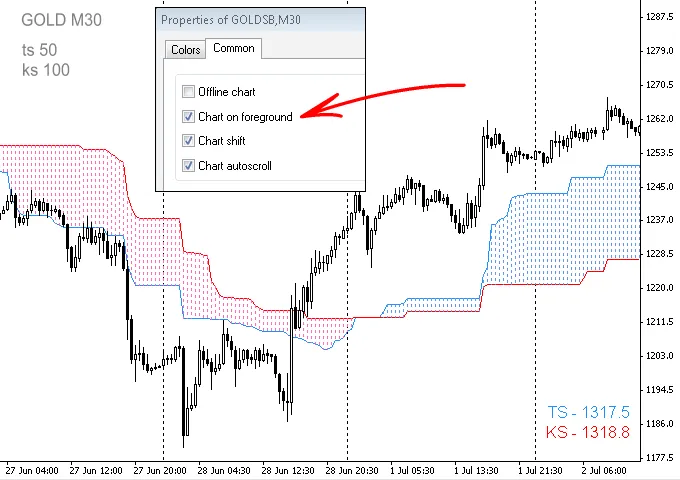
To adjust your chart display, simply head to Chart Properties (press F8).
Parameters and Trading Tips:
- All inputs and parameters can be modified and will save automatically.
- It's a good idea to explore your personal preferences for setup.
- The default periods for Tenkan Sen and Kijun Sen are set to 50 and 100 respectively; feel free to tweak these as needed.
- For better visibility, consider increasing the line thickness.
- Lower timeframes can benefit from the Session Open V-Line Indicator.
- Using Color Fill - Tenkan + Kijun as part of your Trading System or Tool is entirely up to your discretion and creativity.
Quick Note: Just a heads-up, the Tenkan Sen and Kijun Sen are essentially the same indicator. If you're curious, you can prove this by applying the Ichimoku Kinko Hyo Indicator (MT4 → Insert → Indicators → Oscillators → Ichimoku Kinko Hyo) on an H4 chart. Set Tenkan Sen and Kijun Sen to periods 26 and 27, and you’ll notice they’re slightly apart. Adjust both to 27, and they'll overlay perfectly. This tip is to help you avoid any confusion while using the current Indicator.
Tenkan Sen and Kijun Sen Price Labels:
- The Labels are positioned at the bottom right corner but can be moved anywhere on your chart.
- Not in need of them? You can hide the Price Labels easily.
- If you hide the Tenkan Sen or Kijun Sen, the associated Price Label will disappear as well.
To ensure the accuracy of the Price Labels, draw a horizontal line on your chart and set its Parameters - Value to match the price indicated on a TS or KS Label. The horizontal line should line up perfectly with the end of the Tenkan Sen or Kijun Sen based on the Label you choose.
Inputs and Parameters:
- Color_Fill_1_2_3_or_4 - 3;
- Tenkan_sen_Period - 50;
- Kijun_sen_Period - 100;
- TS_Label_Color - indicator_color1;
- KS_Label_Color - indicator_color2;
- Label_Bold - true;
- Label_Size - 12;
- Label_Corner - 3;
- Label_Left_Right - 10;
- Label_Up_Down - 10;
- Show_Tenkan_sen - true;
- Show_Kijun_sen - true;
- Show_Labels - true;
Related Posts
- How to Use the Change Chart Symbol Menu for MetaTrader 4
- Unlocking the Power of Master Tools for MetaTrader 4
- MA Cross Alert Once: A Must-Have Indicator for MetaTrader 4
- Unlocking MetaCOT 2: Your Ultimate CFTC Indicator Toolkit for MT4
- Maximize Your Trading Efficiency with the Latest Period Converter