
Track Variable Spreads with Ease Using an Offline Chart
As traders, we know that many brokers offer variable spreads, but it can sometimes be tricky to figure out what those average values look like and how they fluctuate over time. That's where the Spread Tracker comes in handy!
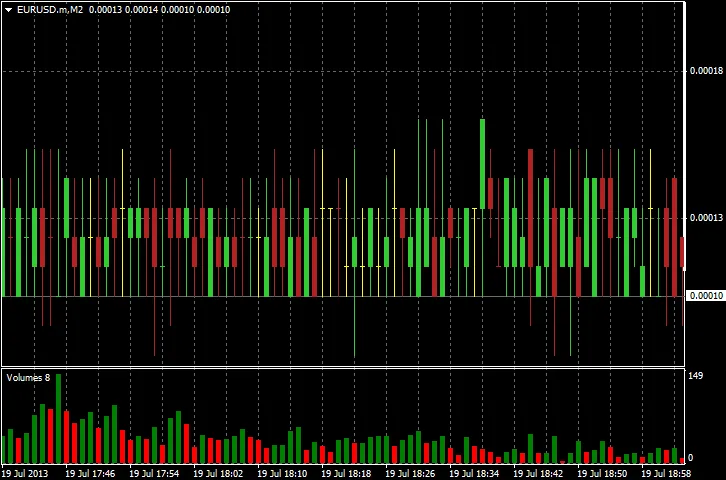
This nifty indicator (Versions 1.0 and 2.0) allows you to monitor the Ask to Bid price spread and logs it in OHLC format to a standard History File. You can then open this file and keep an eye on it in real-time through an Offline Chart. While it's not a traditional indicator, it provides a great way to visualize the variable spread over time.
To get started, simply attach the indicator to an M1 Chart. This will generate an Offline Chart with minute-by-minute spread data. If you prefer, you can also use an H1 Chart for hourly data. With the Offline Chart open, you can apply a simple moving average indicator to track the average spread over time.
Just a heads up: the code uses DLL calls, so make sure to enable the “Allow DLL imports” option in your settings.
Important Note: You’ll need to wait for a complete bar before any data will appear in your Offline Chart. For instance, if you're using an H1 chart, you'll need to wait a full hour to see your first bar.
Update: Version 2.0 has streamlined things by eliminating the need for a non-standard Time Frame as seen in the first version. Instead, it utilizes a Symbol Suffix while keeping the original Time Frame intact. Don't worry—Version 1.0 is still available for those who prefer it!
Instructions for Version 2.0:
Simply attach the indicator to your chosen Chart and select a Symbol Suffix for the Offline Chart that will contain your spread data. This ensures that your Offline Chart retains the original Time Frame, while the Symbol Name will have the Symbol Suffix added to both the Chart Name and the History File Name.
Instructions for Version 1.0:
For this version, just attach the indicator to your Chart and choose a non-standard Time Frame for the Offline Chart that will display the spread data.
Check Out This Example of an Offline Chart:
Related Posts
- Unlocking the Power of Master Tools for MetaTrader 4
- Visualize Current Trends Across All Time Frames with This MetaTrader 4 Indicator
- Mastering the FE Fibonacci Expansion Indicator for MetaTrader 4
- Unlocking MetaCOT 2: Your Ultimate CFTC Indicator Toolkit for MT4
- Unlocking the Power of ColorJFatl_Digit_Alert: Your Go-To MT5 Indicator