
Hey fellow traders! Today, we're diving into the Uniformity Factor Indicator for MetaTrader 5. This handy tool is perfect for anyone looking to analyze the price timeseries and test the hypothesis that it behaves like a 'random walk'—specifically, a Gaussian 'random walk.'
So, why does this matter? Understanding the concept of a 'random walk' is key. In simple terms, after N steps, the expected distance covered is roughly estimated by its standard deviation multiplied by the square root of N (or N^0.5). This can provide insights into price movements that can help you make more informed trading decisions.
The Uniformity Factor Indicator calculates the average price change per bar across predefined bar ranges. It does this by averaging based on a distance taken to the power of F, where F varies from 0.1 to 1 in increments of 0.1. This means you can tailor your analysis for more precise results.
All the bars available on your current chart are utilized for gathering statistics in sliding windows up to N bars. The indicator then determines the most 'regular' or uniform distribution of the statistics among different F values, typically landing around 0.5 or 0.6. Each column in the resulting histogram represents the average delta of points per bar for corresponding trade durations, with the averaging conducted by N^F (setting F=1 gives you standard averaging).
Now, let’s talk about the methods the indicator uses for detecting 'regularity' or flatness in the statistical curve:
- Minimum variance
- Minimum difference between the triple M's (Mean, Median, Mode), calculated as squared error
- Minimum Gini coefficient
Knowing the optimal factor can be a game changer for:
- Normalizing input data (like price changes) for neural networks and other machine learning algorithms
- Estimating the minimum number of bars needed for sampling into a single input vector for volatility trading systems
- Detecting symbols or timeframes with anomalies (like non-standard F values or singularities in the distribution curve)
Inputs
- Period: This is the maximum distance in bars (N) for collecting price range statistics, with a default of 200.
- Factor: This is the exponent for averaging over distances. The default is set to 0 for auto-detection. You can also enter a custom value between 0.0 and 1.0, like 0.525.
- Method: Choose one of the estimation methods for uniformity: variance, triple_M, or Gini.
- MaxBars: This limits the number of bars for calculating statistics, set to 0 by default—meaning all available bars will be used.
Note: If you opt for an unlimited number of bars or hundreds of thousands on your chart, calculations may take a bit longer. If that’s a concern, consider limiting the bars to tens of thousands.
Outputs
The indicator displays a blue histogram showing the average price change per bar for each distance in the range (1..Period) and for the selected uniformity factor. Additionally, a continuously increasing number of bars (distance) is represented as a second histogram (orange) for your reference.
A complete table of tested factors and corresponding metrics of the current timeseries is logged for your convenience.
XAGUSD.c D1, Max.Distance: 500, Bars: 2641
Factor: 0.4, Result: var(0.4) mmm(0.4) gini(0.4)*
    [factor]  [mean] [variance] [skewness] [kurtosis] [median]  [mode] [mmmse]  [gini]
[0]  0.100001.85217    0.21976   -0.87694    0.07751  1.958222.308530.338110.13930
[1]  0.200001.07575    0.04083   -1.12699    0.96219  1.127151.257860.132850.10093
[2]  0.300000.62887    0.00525   -1.54472    3.00927  0.648780.686160.041140.05943
Screenshots
Check out these screenshots showing the indicator across three different timeframes: D1, H1, and M1. Each chart features two instances of the indicator:
- The upper one is set for F auto-detection using the Gini method, with the detected value displayed in the title (marked with an asterisk).
- The lower one is configured for a predefined F=0.6.
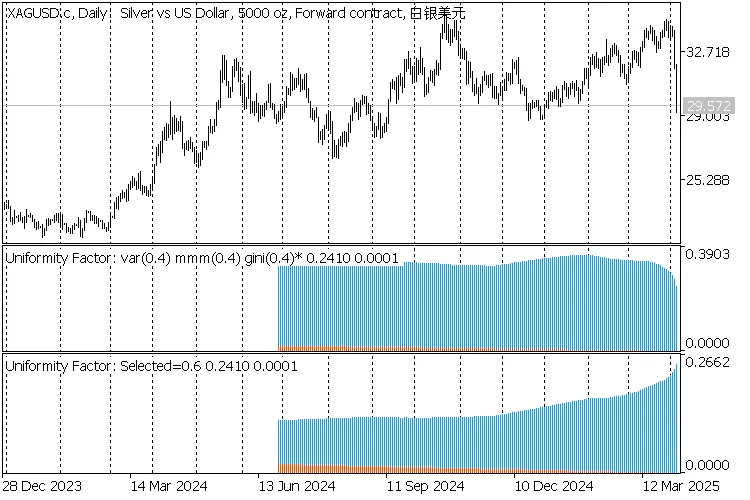
2 indicators Uniformity Factor on XAGUSD,D1
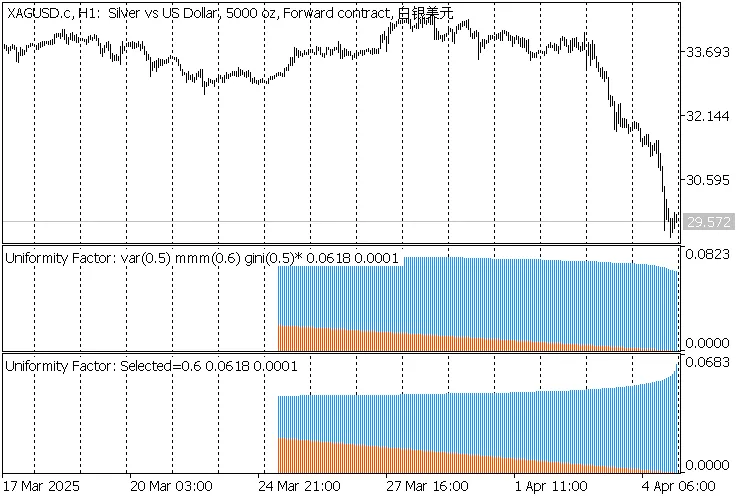
2 indicators Uniformity Factor on XAGUSD,H1
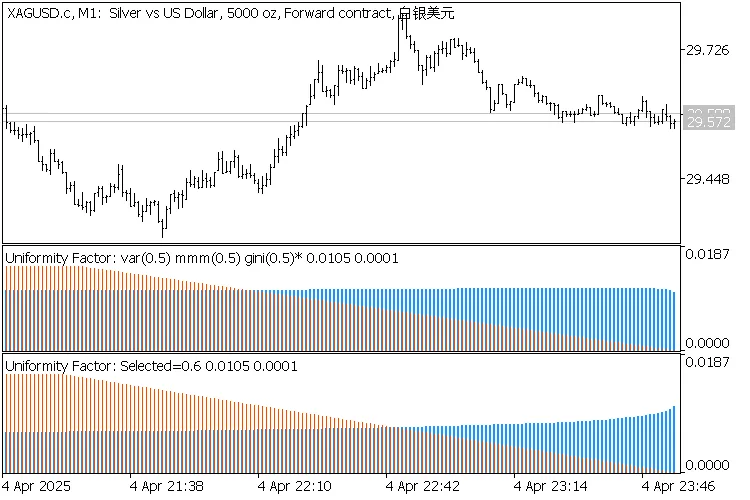
2 indicators Uniformity Factor on XAGUSD,M1




Comments 0