
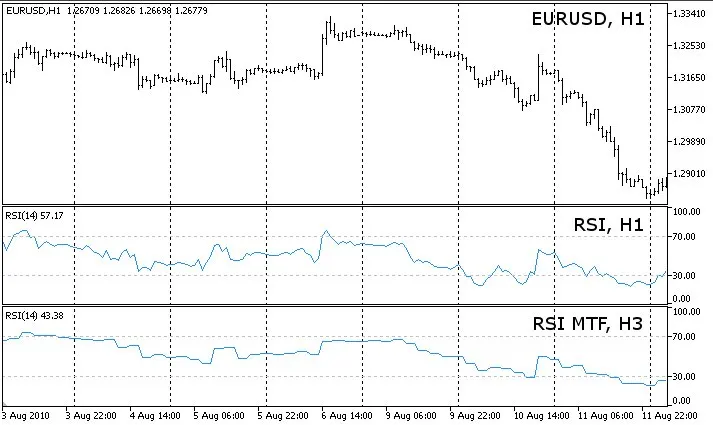
The RSI, or Relative Strength Index, is a powerful tool that can be used across any timeframe, whether you're looking at a higher time frame or a lower one than what’s currently displayed on your chart.
**Quick Tip:** If you're interested in crafting your own multi-timeframe indicators, take a look at this RSI MTF (Multi-Timeframe) indicator as a prime example. It has a single buffer, making the code more streamlined and easier to digest compared to other multi-timeframe indicators that can get pretty bulky.
You can utilize all the classic parameters from the built-in iRSI indicator. The only additional setting you'll need is the secondary timeframe that will feed into your calculations.
Keep in mind that when you apply the indicator to a timeframe that’s lower than the one on your chart, it can't display all the values at once. So, depending on the type of price you choose, it adopts a different method to provide the most relevant value.
Here are two scenarios:
- Scenario 1: If your timeframe_1 is set to 5 minutes and timeframe_2 to 1 minute, using the Close price series:
For any bar on timeframe_1, the indicator will display the most recent bar from timeframe_2 that closed at or before the close of the bar in timeframe_1. This applies to both closed bars and the current open bar.
- Scenario 2: With timeframe_1 at 5 minutes and timeframe_2 at 1 minute, but calculating based on the Open price series:
For each bar in timeframe_1, the indicator will show the latest bar from timeframe_2 that opened at or before the open of the bar in timeframe_1. This is particularly useful because if you're trading based on the open of a new bar, you’ll only have the open of the first of the five 1-minute bars that make up that 5-minute bar. The opens of the subsequent 1-minute bars are ignored in the calculations.
You can mix and match any time frames, even if they’re not synchronized, like using timeframe_1 as 5 minutes and timeframe_2 as 12 minutes. The indicator ensures they stay in sync, employing a method similar to the scenarios above.
For a more visual take on this, check out the MACD Histogram MTF MC indicator, which includes a handy Excel sheet for better understanding.
Heads Up! When switching between timeframes, give it a few seconds for the price data to load properly. If you don't see the indicator, try refreshing the chart manually.
To toggle error messages, look into the source code:
bool ShowErrorMessages=false; // turn on/off error messages for debugging
Update History:
2010-09-26: v04
- Improved value display for timeframes smaller than the chart's timeframe;
- Set buffers to EMPTY_VALUE instead of 0 after: if(convertedTime<tempTimeArray_TF2[0]);
- Optimized code;
- Removed PLOT_DRAW_BEGIN from OnInit() - inherited from single timeframe indicator;
- Moved ArraySetAsSeries of buffers and arrays into OnInit();
2010-09-06: v02
- Fixed a bug with Time[] array that led to incorrect drawing of the indicator;
2010-08-25: v01
- Initial release of the indicator;




Comments 0