
The QQE Indicator for MetaTrader 4, standing for Quantitative Qualitative Estimation, is a powerful tool that utilizes a sophisticated calculation of smoothed RSI indicators. This results in two distinct lines displayed in a separate indicator window: a fast line and a slow line. A key level to watch for is 50, which plays a crucial role in generating trading signals. You can also set up text, sound, and email alerts to keep you informed. Plus, this QQE version supports multi-timeframe analysis, allowing you to view upper timeframe data right on your charts. It's compatible with both MT4 and MT5.
The version of the QQE indicator we’re discussing is free and open-source, making it a breeze to download and install on your trading platform.
Input Parameters
- SF (default = 5) — Smoothing factor.
- AlertOnCrossover (default = false) — Set to true to enable alerts when the two QQE lines cross each other.
- AlertOnLevel (default = false) — Set to true to receive alerts when the QQE RSI line crosses the specified level.
- AlertLevel (default = 50) — The alert level for the indicator. It's best not to change this.
- ArrowsOnCrossover (default = true) — Set to true to draw arrows on the chart when the QQE lines cross.
- CrossoverUpArrow (default = clrGreen) — Color of the arrow for a bullish crossover.
- CrossoverDnArrow (default = clrRed) — Color of the arrow for a bearish crossover.
- ArrowsOnLevel (default = true) — Set to true to draw arrows when the QQE RSI line crosses the specified level.
- LevelUpArrow (default = clrGreen) — Arrow color for an upward level cross.
- LevelDnArrow (default = clrRed) — Arrow color for a downward level cross.
- NativeAlerts (default = false) — Set to true to receive message alerts.
- EmailAlerts (default = false) — Set to true to receive email alerts based on your MetaTrader email settings.
- NotificationAlerts (default = false) — Set to true to receive push notifications based on your MetaTrader notification settings.
- UpperTimeframe (default = PERIOD_CURRENT) — If set to a higher timeframe, the indicator will calculate data based on that timeframe.
- ObjectPrefix (default = "QQE-") — The prefix for chart objects to ensure compatibility with other indicators.
Strategy and Example
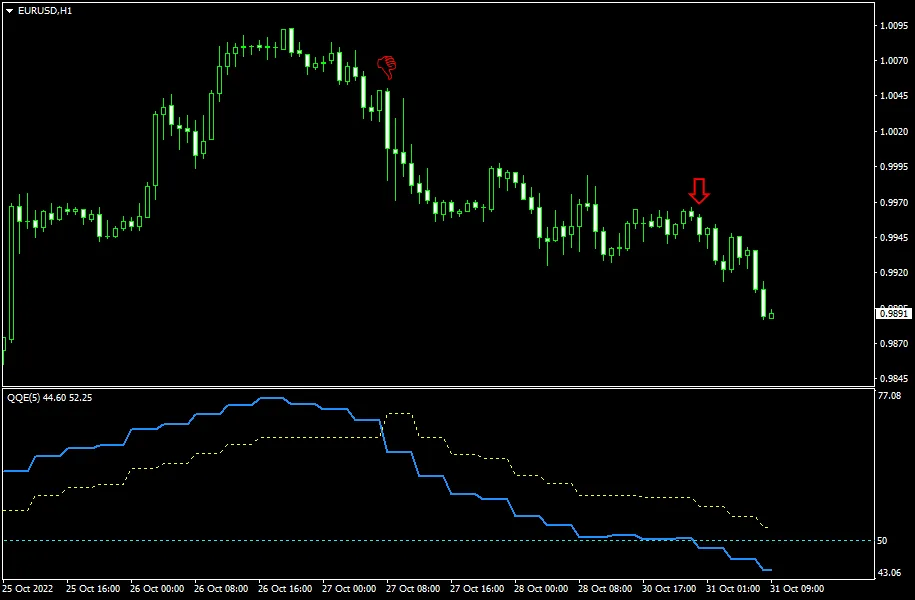
The QQE indicator serves as an oscillator that can be utilized for both direct signaling and divergence analysis. It generates two types of signals: when the two lines cross each other, and when the blue line crosses a certain level. A sell signal occurs when the blue line crosses the yellow line from above, while a buy signal is triggered when it crosses from below. Similarly, if the blue line crosses a specified level from above, it indicates a sell signal, and crossing from below suggests a buy signal.
In the example below, we have a EUR/USD hourly chart featuring a QQE instance that uses 4-hour chart data for plotting the lines. The two red arrows highlight bearish signals: the first arrow indicates a crossover of the lines, while the second arrow corresponds to the blue line crossing the 50 level.




Comments 0