
Author: DVYU inc.
If you're looking to enhance your trading strategy, the Pivot_RS_Session indicator for MetaTrader 5 is a fantastic tool to consider. This nifty indicator displays Pivot levels while also highlighting the session during which these levels were calculated, making it easier to track your trades.
Key Features of the Pivot_RS_Session Indicator
- Session Highlights: The indicator uses a special background color to indicate the session when the Pivot levels were established.
- Customizable Colors: You can easily adjust the colors for various levels such as resistance and support, allowing you to personalize your trading chart.
- Session Timing: Set specific start times and durations for sessions to align with your trading schedule.
Indicator Input Parameters
//+----------------------------------------------+
//|   Input Parameters for the Indicator          |
//+----------------------------------------------+
input Hour   StartHour=H08;              // Hour when the session starts
input Min     StartMinute=M00;            // Minute when the session starts
input uint   SessionTime=400;            // Duration of the session in minutes
input color   Color_Session = clrPlum;    // Color for the session background
input color   Color_Res = clrBlue;        // Resistance level color
input color   Color_R30 = clrGreen;       // R30 level color
input color   Color_R20 = clrGreen;       // R20 level color
input color   Color_R10 = clrGreen;       // R10 level color
input color     Color_P = clrDarkOrchid    // Pivot level color
input color   Color_S10 = clrRed;         // S10 level color
input color   Color_S20 = clrRed;         // S20 level color
input color   Color_S30 = clrRed;         // S30 level color
input color   Color_Sup = clrMagenta     // Support level color
//---
input STYLE   Style_Res = SOLID_;         // Resistance line style
input STYLE   Style_R30 = SOLID_;         // R30 level line style
input STYLE   Style_R20 = SOLID_;         // R20 level line style
input STYLE   Style_R10 = SOLID_;         // R10 level line style
input STYLE     Style_P = DASH_;          // Pivot level line style
input STYLE   Style_S10 = SOLID_;         // S10 level line style
input STYLE   Style_S20 = SOLID_;         // S20 level line style
input STYLE   Style_S30 = SOLID_;         // S30 level line style
input STYLE   Style_Sup = SOLID_;         // Support line style
//---
input Width   Width_Res = Width_2;        // Width for resistance line
input Width   Width_R30 = Width_1;        // R30 level line width
input Width   Width_R20 = Width_2;        // R20 level line width
input Width   Width_R10 = Width_3;        // R10 level line width
input Width     Width_P = Width_1;        // Pivot level line width
input Width   Width_S10 = Width_3;        // S10 level line width
input Width   Width_S20 = Width_2;        // S20 level line width
input Width   Width_S30 = Width_1;        // S30 level line width
input Width   Width_Sup = Width_2;        // Width for support line
This indicator was initially developed in MQL4 and made its debut on the Code Base at mql4.com back on January 30, 2008.
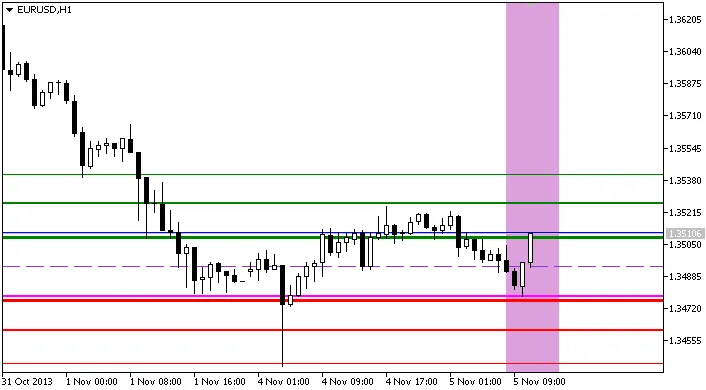
Indicator Pivot_RS_session
Related Posts
- Unlocking MetaCOT 2: Your Ultimate CFTC Indicator Toolkit for MT4
- Mastering the MACD Candle Indicator for MetaTrader 4
- Mastering the Fibonacci ZigZag Indicator for MetaTrader 5
- Mastering the FE Fibonacci Expansion Indicator for MetaTrader 4
- Hourly Buffers for Data Collection in MetaTrader 5: A Simple Guide