
Unlocking the Power of the 2 MA Channel Breakout
Hey fellow traders! Today, let’s dive into a nifty tool that can help you navigate your trades more effectively: the 2 MA Channel Breakout indicator. This indicator is all about spotting trends using the crossover of a fast and slow Exponential Moving Average (EMA).
How It Works
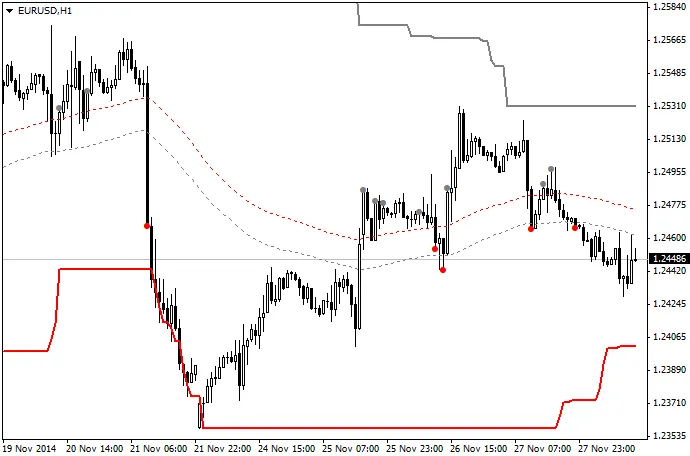
Here’s the scoop: the indicator tracks when a fast EMA crosses over a slow EMA to indicate the primary trend. Once a breakout occurs—when the candle closes above or below the channel—you’ll see a dot appear. If the dot is white, it’s a signal to place a buy order at that level. Conversely, if it’s red, you should consider selling.
Setting Your Stop Loss and Take Profit
- Stop Loss (SL): The two dotted lines represent your stop loss levels, calculated based on the high-low channel using the specified EMAs.
- Take Profit (TP): The thicker lines indicate your take profit levels, based on the highest high and lowest low from a set number of bars.
My Setup
In my trading, I use a fast EMA of 89 and a slow EMA of 144, along with these same values for the SL and TP levels. I find this setup works best on a 1-hour chart or higher.
Looking Ahead: Creating an EA
I’m also thinking of developing an Expert Advisor (EA) that utilizes this indicator. The idea is to have the EA automatically place pending orders based on the latest signal levels, along with an efficient trailing stop loss and take profit system.
Feedback Welcome!
This is my first indicator, and I’m eager to hear your thoughts! Feel free to share any comments or suggestions on how I can improve it. Happy trading!
Related Posts
- Hourly Buffers for Data Collection in MetaTrader 5: A Simple Guide
- Unlocking MetaCOT 2: Your Ultimate CFTC Indicator Toolkit for MT4
- Unlocking the Power of Master Tools for MetaTrader 4
- Mastering the Open Range Breakout Indicator for MetaTrader 5
- Unlock Trading Insights with Volume Profile + Range v6.0 for MetaTrader 5