
Hey traders! Today, we’re diving into the essential world of resistance and support lines, specifically how they work with the iFractals indicator. It’s important to note that the last value of Fractals can change, which is why we analyze 5 additional bars for accuracy.
//--- number of values copied from the iFractals indicator
   int values_to_copy=-1;
//--- if it is the first start of calculation of the indicator
   if(prev_calculated==0)
      values_to_copy=rates_total;
   else
     {
      //--- it means that it's not the first time of the indicator calculation, and since the last call of OnCalculate()
      //--- for calculation not more than one bar is added
      //--- value "+5" - because of the feature of drawing fractals
      values_to_copy=(rates_total-prev_calculated)+5;
     }
Now, if you want to compare the "Resistance & Support" and "Fractals" indicators in the strategy tester, here’s how to do it:
- First, attach the "Fractals" indicator to a clear chart.
- Next, right-click on the chart, go to Templates, and select Save Template. Name it "tester" to save the chart setup with the Fractals indicator in the "tester.tpl" template.
- Then, you can start testing by:
- Debugging on history (just hit "Ctrl" + "F5" in the MetaEditor)
- Or doing some visual testing from the terminal in the Strategy Tester window.
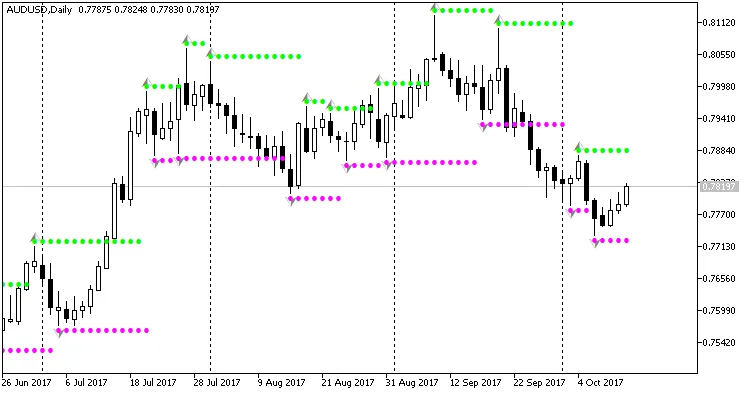
Below, you’ll see how the "Resistance & Support" indicator performs in the strategy tester:
Related Posts
- Unlocking MetaCOT 2: Your Ultimate CFTC Indicator Toolkit for MT4
- Unlocking the Power of Master Tools for MetaTrader 4
- Visualize Current Trends Across All Time Frames with This MetaTrader 4 Indicator
- Unlock Trading Insights with Volume Profile + Range v6.0 for MetaTrader 5
- Mastering the MACD Candle Indicator for MetaTrader 4