
Description:
If you're diving into the world of trading, understanding volatility is key. This simple indicator calculates the volatility of a specific currency pair or any other security available in your trading terminal. It measures volatility in points based on the High and Low prices, not the Open or Close.
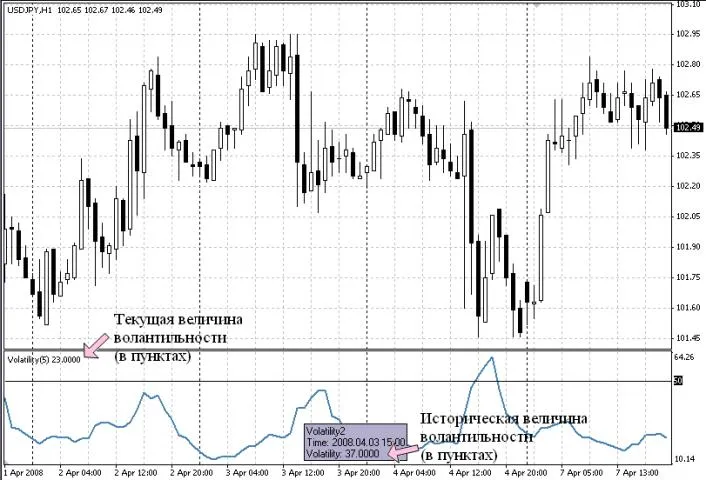
The current volatility level is displayed in the upper left corner of the indicator window. To see the historical values, simply hover your cursor over the volatility chart.
The indicator allows for several adjustments:
- Averaging Period: By default, this is set to 5 periods, which means the volatility is averaged over the last 5 periods.
- Important Levels: You can set a volatility threshold below which entering the market may not be advisable. For volatile pairs like GBPJPY, default levels are set at 50, 100, 200, 300, and 400 points.
- Customization: You can modify the drawing lines and colors of the indicator for better visibility.
Understanding the Calculation:
Volatility is calculated using a straightforward average formula: the sum of High prices over the averaging period minus the sum of Low prices, expressed in points:
(IMA (High, 5) - IMA (Low, 5)) * 100
In this formula:
- High and Low represent the highest and lowest prices during the period.
- 5 is the default averaging period, but you can adjust this as needed.
- 100 converts the result into points, depending on the number of decimal places in the currency pair (for example, 100 for pairs quoted with JPY, and 10,000 for other pairs).
It's crucial to evaluate symbols based on their volatility. You might want to focus on the most or least volatile pairs to optimize your trading strategy. For that, you can use the Volatility 3 Pairs.mq4 indicator:
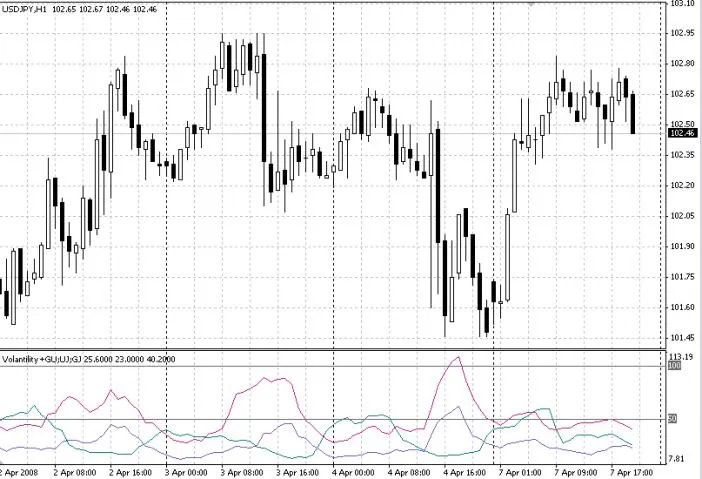
This indicator is tailored to assess the volatility of three specific pairs: GBPUSD, USDJPY, and GBPJPY. No matter which chart you attach it to, it will calculate volatility solely for these pairs. If you need to adjust the pairs, you can easily do so by editing the program in MetaEditor:
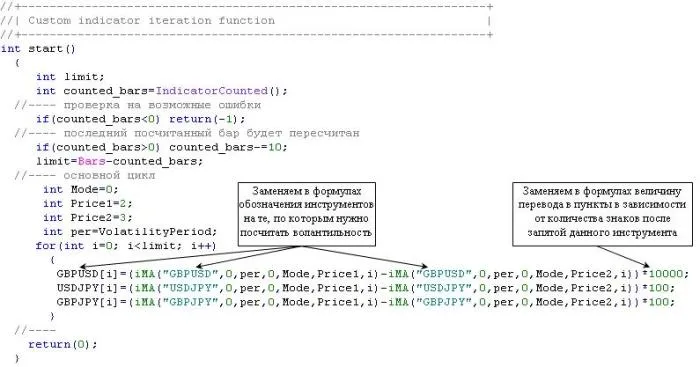
Make sure to update the relevant sections in the code:
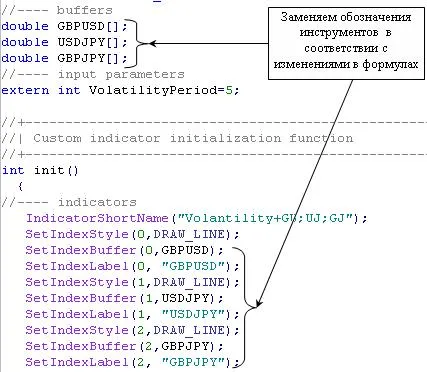
Additionally, you can increase the number of symbols for volatility calculation, just remember to add the appropriate buffers (up to a maximum of 8) and make the necessary code adjustments.




Comments 0