
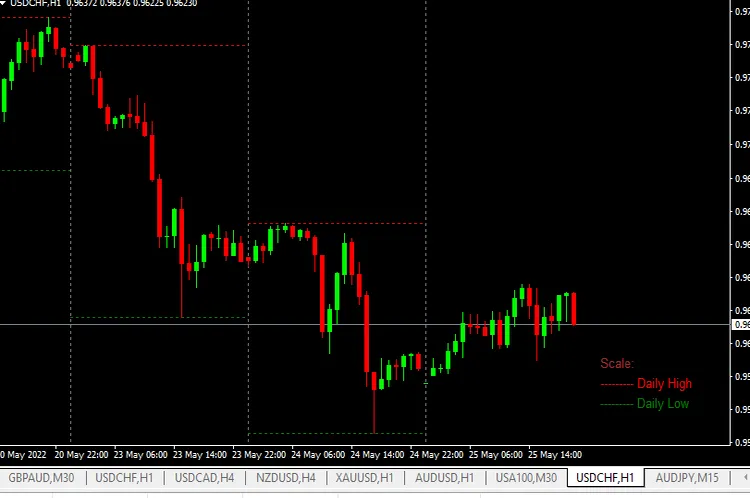
Hey there, fellow traders! If you’re looking to sharpen your trading skills, understanding market highs and lows is essential. Today, we’re diving into how to utilize this key indicator in MetaTrader 4 to enhance your trading strategy.
What are Market Highs and Lows?
Market highs and lows are crucial points that indicate the highest and lowest prices during a specific period. These levels can help you gauge market sentiment and identify potential reversal points.
Why Use This Indicator?
- Identify Trends: Recognizing highs and lows can help you determine if the market is in an uptrend or downtrend.
- Set Entry and Exit Points: By knowing these levels, you can make more informed decisions on when to enter or exit trades.
- Manage Risk: Highs and lows can serve as support and resistance levels, allowing you to set better stop-loss orders.
Now that you understand the importance of market highs and lows, let’s take a look at how to apply this in MetaTrader 4.
Setting Up the Indicator
1. Open your MetaTrader 4 platform.
2. Navigate to the 'Insert' menu.
3. Choose 'Indicators' and then select 'Custom'.
4. Find 'Market Highs and Lows' and click 'OK'.
5. Customize the settings to suit your trading style.
Once you’ve added the indicator, you’ll start to see the highs and lows plotted on your chart. This visual representation will help you spot key levels at a glance.
Final Thoughts
Incorporating the market highs and lows indicator into your trading toolkit can significantly enhance your trading decisions. Remember, trading is all about making informed choices, and knowing these critical price points can give you an edge. Happy trading!




Comments 0