
As traders, we often need to adapt our strategies to suit the market's rhythm, and one effective tool in our arsenal is the Custom Angle Trendline. For instance, a 45-degree angle is frequently seen as a key indicator of bullish or bearish trends.
This handy indicator allows you to draw trendlines at your preferred angle, tailoring your analysis to your specific needs by using the last input number of bars.
Getting Started:
- First, right-click on your chart.
- Navigate to Properties.
- Head over to the Common tab and scale your chart to a comfortable view.
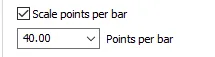
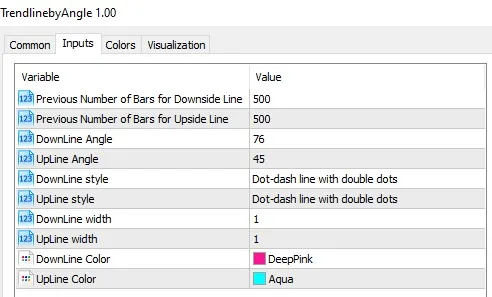
Next, select Indicator Settings, where you can input your custom angle in degrees (for example, 45°).
You’ll have two options:
- Set the downline angle degree.
- Set the upline angle degree.
Additionally, you can specify how many previous bars to include in your calculations. The indicator will then identify the two most recent highs and lows for the selected bars, plotting a trendline that adheres to your custom angle.
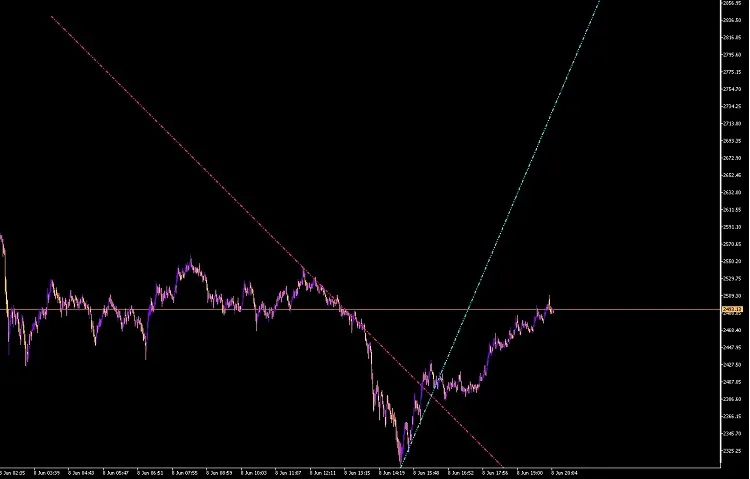
With this indicator, you can fine-tune your technical analysis and make more informed trading decisions. Happy trading!




Comments 0