
Author: Shimodax
Welcome to the world of trading with the SDX-TzPivots indicator for MetaTrader 4! This handy tool calculates pivot and similar levels based on different time zones, giving you the edge you need in your trading strategy.
If you're looking to jazz up the colors of your pivot levels, simply scroll down to line 200 in the code (where you see "Calculate Levels") and tweak the color settings. You can find valid color names by hovering over the color name (like “Orange”) and pressing F1 to get the details.
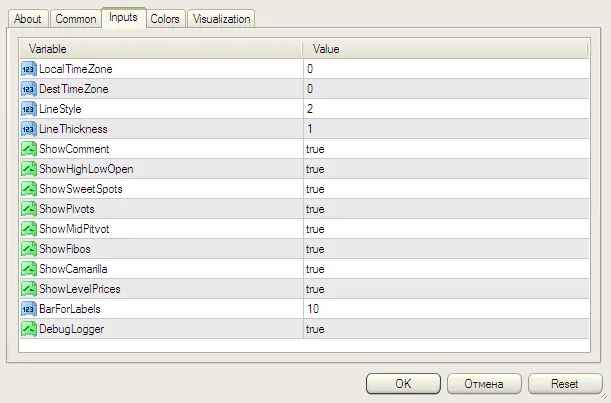
Time Zone Inputs:
- LocalTimeZone — This is your local time zone as shown in MetaTrader 4. For example, enter 1 or 2 for Europe (GMT+1 or GMT+2 during daylight savings). If you don't need any adjustment, just use zero. Remember, the MetaQuotes demo server runs on GMT+2.
- DestTimeZone — This refers to the time zone for the session you're calculating levels from. Enter 1 or 2 for the European session, depending on whether it's daylight savings or not. Use zero for GMT.
Practical Example:
Let’s say your MetaTrader server is set to EST (Eastern Standard Time, GMT-5), and you want to calculate levels for the London trading session (which is GMT+1 in summer). In this scenario, you’d enter -5 for LocalTimeZone and 1 for DestTimeZone.
Remember, the LocalTimeZone setting is based on your MetaTrader chart times. For instance, the MetaQuotes demo server is always set in CDT (+2) or CET (+1), regardless of your wall clock. If you’re ever unsure, just leave everything set to zero.

Quick Tips:
- BarForLabels: Set the number of bars from the right side where the line labels will appear.
- Comment Feature: You can display information in the upper left corner, such as Range, Highs, Lows, and Close for Yesterday and Today.
Happy trading, and may the pips always be in your favor!