
Understanding the Power of USD with the Average Indicator
Version 229.201
This latest version of the indicator offers a fresh perspective on the relative strength of the USD. It provides a clear view of how the dollar is performing against other currencies.
The zero line (0.0) represents the average over a defined period, which you can adjust using the AveragePeriod variable.
By analyzing the closing prices of seven currency pairs that include the USD, this indicator gives traders valuable insights.
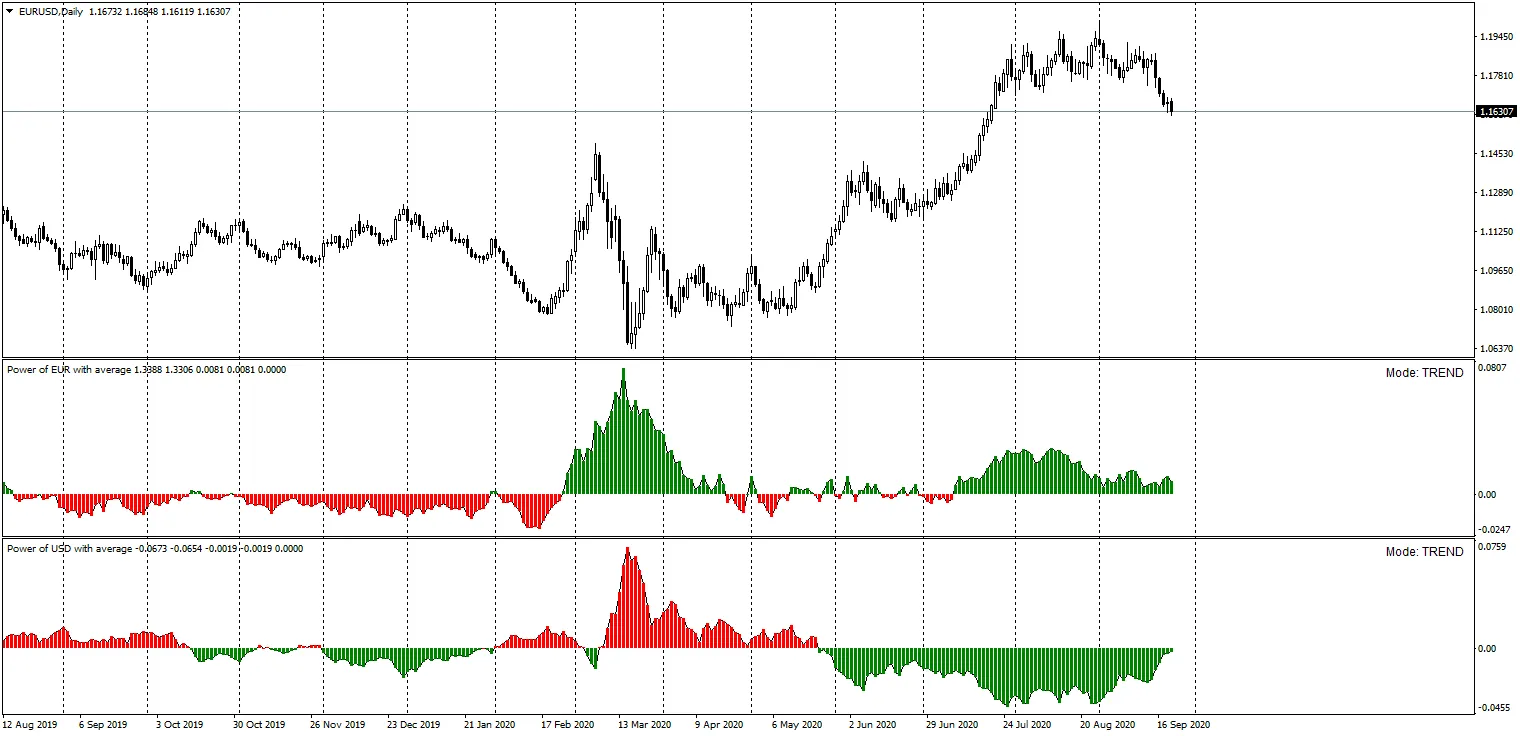
To make market analysis easier, we’ve added a colored histogram, which helps visualize the current market situation at a glance.
Now, you have two modes to choose from:
TREND
COUNTER-TREND
When the BASE and QUOTE currencies are in the same color during equal mode, it signals a stronger opportunity to trade in the right direction.
Example 1: BUY Signal
Currency Pair: EUR/USD
Using the TREND mode for both Power of EUR with Average and Power of USD with Average, if both indicators display a GREEN color, you should consider this a signal to BUY the EUR/USD pair.
Example 2: SELL Signal
Currency Pair: EUR/USD
Again, using the TREND mode for both Power of EUR with Average and Power of USD with Average, if both indicators show a RED color, it’s a clear signal that you should be ready to SELL the EUR/USD pair.




Comments 0