
Description:
Introducing the Noise-Reduced Stochastic Oscillator!
This innovative indicator builds on the standard Stochastic Oscillator, but with a twist. It features an added sensitivity parameter (Sens) to help filter out the noise in your trading signals.
Like the standard Stochastic, this version maintains the same parameters, yet it allows you to focus on oscillations that fall below a predefined threshold, measured in points. This means fewer false signals, which is always a win for traders!
Traditionally, the Lane Stochastic places the current price between the highest and lowest prices defined by the %K (Kperiod) value without distinguishing between extreme points, whether they are 1 point or 100 points apart. In both scenarios, you'll end up with similar overbought/oversold signals.
By incorporating a threshold, you can now focus on only the significant price movements.
Check out Fig. 1 below, where you can see the price chart for EURUSD on a 1-minute timeframe along with the standard Stochastic and the Noise-Reduced Stochastic indicator in action.
Image:
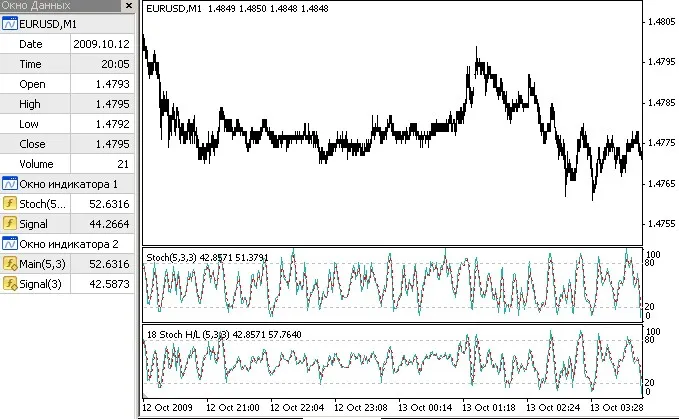
Fig 1.
The indicator fields mirror those of the iStochastic, but remember, we’re adding that extra Sens parameter.
The output buffers are consistent: 0 is for the Stochastic value itself, while 1 is for the signal line.
doubleiCustom(string symbol,int timeframe,"_StochNR",int%Kperiod,int%Dperiod,int slowing,int method,int price_field,int mode,int shift);// StochNR added new Sens fielddoubleiStochastic(string symbol,int timeframe,int%Kperiod,int%Dperiod,int slowing,int method,int price_field,int mode,int shift)// standard stochastic
For practical implementation, you can call it as described, but a smoother approach would be to integrate some code into your Stoch function:
double Stoch(int Kperiod,int Slowing,int PriceField,double sens,int i){
   // maximum and minimum prices
   double max,min,c;
   for(int j=i; j<i+Slowing; j++){
      if(PriceField==1){// based on Close
         max+=Close[ArrayMaximum(Close,Kperiod,j)];
         min+=Close[ArrayMinimum(Close,Kperiod,j)];
        }
      else{// based on High/Low
         max+=High[ArrayMaximum(High,Kperiod,j)];
         min+=Low[ArrayMinimum(Low,Kperiod,j)];
        }
      c+=Close[j];
     }

   double delta=max-min;
   if(delta<sens){
      sens/=2;
      max+=sens; min-=sens;
     }
   delta=max-min;
   if(delta==0)double s0=1;
   else s0=(c-min)/delta;

   return(100*s0);
  }
As you can see, if you're looking to generate a signal line, you'll need an additional moving average of its values. Alternatively, you can extract it from the iCustom's first buffer, but that may slow things down.
With this updated naming convention, it's clear that the price calculation type is incorporated. If the sensitivity is set above zero, this value will also appear in the oscillator's name.
Editor's Note:
This content is a direct adaptation of the original Russian version.
If you have any questions for the author or would like to share your thoughts, feel free to drop them here.
If you find this code helpful for your trading or educational needs, don’t forget to show some appreciation for the author!




Comments 0