
Hey fellow traders! If you're looking to stay ahead in the fast-paced world of Forex, then you’ll want to check out the FFC - Forex Factory Calendar. This nifty tool is a revamped version of the well-known FFCal indicator, which was originally created by the talented DerkWehler over at Forex Factory. I've made a few tweaks to better fit my trading style, and I think you’ll find it just as useful!
This indicator adds a handy panel right on your chart, showcasing the five most relevant economic events from the Forex Factory Calendar. You can easily filter events by their impact—High, Medium, or Low—along with Speeches, Holidays, or even specific keywords. For a complete rundown of the modifications I've made, check out the details here.
Additionally, you can integrate this indicator into your Expert Advisor (EA) via the iCustom() function, tapping into two key buffers:
- Buffer (0) shows the minutes until the next event.
- Buffer (1) indicates the impact value of the upcoming event (Low = 1, Medium = 2, High = 3).
Here’s how you can call the buffers:
Simple Call: (default values will be applied)
int EventMinute = (int)iCustom(NULL,0,"FFC",0,0);
if(EventMinute == 30) { .. YOUR CODE .. } // 30 minutes before the eventint EventImpact = (int)iCustom(NULL,0,"FFC",1,0);
if(EventImpact == 3) { .. YOUR CODE .. } // High impact event
Advanced Call:
iCustom(
        string       NULL,            // symbol
        int          0,               // timeframe
        string       "FFC",           // path/name of the custom indicator compiled program
        bool         true,            // true/false: Active chart only
        bool         true,            // true/false: Include High impact
        bool         true,            // true/false: Include Medium impact
        bool         true,            // true/false: Include Low impact
        bool         true,            // true/false: Include Speaks
        bool         false,           // true/false: Include Holidays
        string       "",              // Find keyword (case-sensitive)
        string       "",              // Ignore keyword (case-sensitive)
        bool         true,            // true/false: Allow Updates
        int         4,               // Update every (in hours)
        int          0,               // Buffers: (0) Minutes, (1) Impact
        int          0                // shift
        );
*Please note that the indicator currently lacks back-testing capabilities.
Suggested Style:
- High Impact color = C'217,83,79'
- Medium Impact color = C'255,185,83'
- Low Impact color = C'91,192,222'
- Holidays color = clrOrchid
- Remarks color = clrDimGray
Calendar Legend:
- m/m: Month Over Month
- q/q: Quarter Over Quarter
- y/y: Year Over Year
- K: Thousand
- M: Million
- B: Billion
- T: Trillion
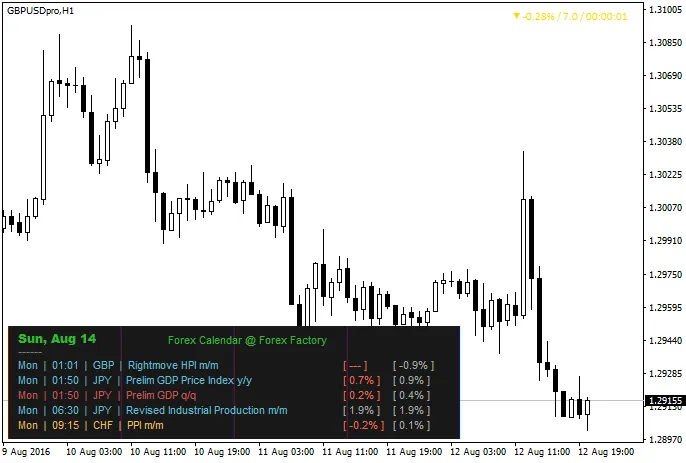
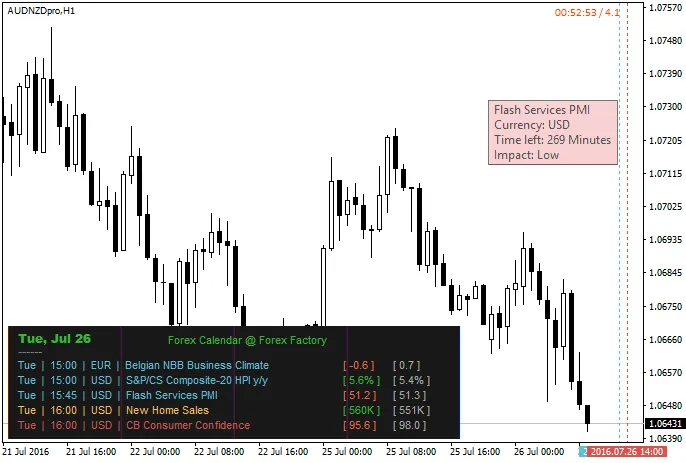
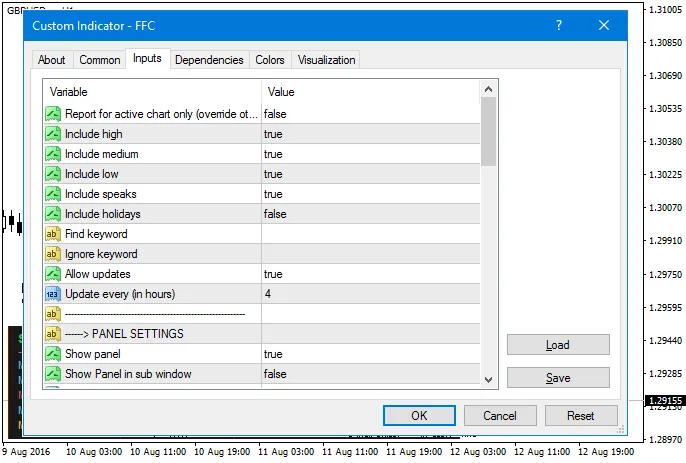
Modifications:
- Added: #property strict for compatibility with MetaTrader 4 Build 600+ and improved code quality.
- Added: Display of previous/forecast impact (colored impact).
- Added: Option to show events related to the active chart only (overriding other parameters).
- Added: Keyword filter to find or ignore specific words, like "NFP". (case-sensitive)
- Added: Options to show currency strength, bar time left, and spread value.
- Added: Control over the display time for past events (in minutes).
- Added: Panel location options in all four corners of the chart.
- Added: Tooltip on mouse hover showing event title, impact, and remaining time.
- Added: Panel title for your personal notes :)
- Modified: Event display now shows in "Date/Time format" instead of just minutes left (minutes left are shown in the tooltip).
- Modified: Vertical lines for upcoming events (you may need to adjust the time offset based on your broker’s time).
- Modified: Buffers for upcoming event minutes and impact (see earlier examples).
- Modified: Revised order of external inputs.
- Improved: Replaced DownLoadWebPageToFile() function with the native Windows URLDownloadToFileW() function.
- Improved: Modularized the download/read XML file code.
- Improved: Updated the time GMT offset to display events in your local time automatically.
- Improved: Justified the panel/text for left/right alignment.
- Improved: Alert function now sends Popup Alerts, sound alerts, Push notifications to your phone, and emails. (two separate alerts)
- Improved: Lighter and faster code for the indicator.
- Fixed: Various bug fixes, removed unnecessary codes, and optimized variable scopes.
Real Authors:
Credit:
- JimDandy
- WHRoeder
- RaptorUK
* To use this indicator, ensure DLL Imports are enabled in your MetaTrader 4 settings.
* Keep in mind that the code might contain some bugs, so if you notice any issues or have suggestions for improvement, feel free to reach out.
* All event times are approximate and subject to change, as noted by Forex Factory.




Comments 0