
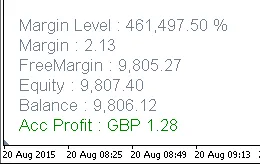
If you're looking to streamline your trading experience on MetaTrader 4, adding account information directly to your charts can be a game changer. With indicators that display Profit, Balance, Equity, Free Margin, Margin, and Margin Level %, you’ll have all the vital stats at a glance.
Two Handy Indicators
- Account Info Vertical 4.01: This indicator arranges your account details vertically on the chart for a clean and organized look.
- Account Info Horizontal 4.01: Prefer a more laid-back style? This one lays out your account info horizontally.
How to Manage Your Account Info Display
- Hide Account Information: Simply click anywhere on the account information text.
- Show Account Information: Click on the text that says 'Account Info'.
- Show Profit Only: Just select 'true' in the Inputs value.
Both indicators maintain equal spacing between headers, ensuring there’s no overlap—this is key for a clean display. Check out the recommendations below for optimal settings!
The hide/show feature responds based on incoming ticks or chart refreshes. So, if you’re in a market with low ticks or it’s closed, you might notice that the indicator doesn’t immediately show the changes. Don’t worry, an autorefresh timer indicator is included in the download. Just attach it to one chart, and it will refresh all instances of both vertical and horizontal account info.
Increasing the autorefresh frequency won’t significantly impact your CPU load if you’re using up-to-date equipment. You can use a free program like Core Temp from http://www.alcpu.com/CoreTemp/ to monitor your CPU load, temperature, and RAM usage to keep track of your system's performance.

Recommendations for Optimal Display
Ensure Equal Spacing: To maintain a neat display, it’s crucial that the space between your account info headers is uniform.
- Make sure the distances between successive account headers are consistent.
- Adjusting font size should not cause any overlap between headers.
Vertical Spacing:
For vertical sequences, the equal spacing is controlled by the OBJPROP_YDISTANCE parameter. Here’s how it works:
- Each header’s spacing is calculated based on the font size and follows an even sequence (2, 4, 6, etc.).
- This spacing prevents overlap as each adjustment in font size translates proportionally.
- Maintain vertical shifts by including the
OBJPROP_YDISTANCEinput parameter.
See the code example below for how to implement this:
inputint Up_Down=10; // Up <-> Down
..........
intOnInit()
 {
   ..........
   {
    Up_Down_ML=Up_Down+Font_Size*10;
    Up_Down_M =Up_Down+Font_Size*8;
    Up_Down_FM=Up_Down+Font_Size*6;
    Up_Down_E =Up_Down+Font_Size*4;
    Up_Down_B =Up_Down+Font_Size*2;
    Up_Down_P =Up_Down;
   }
   ..........
intOnCalculate(constint rates_total,
                constint prev_calculated,
                constdatetime &time[],..........)
 {
  ..........
  // Balance Header YDISTANCE
  ObjectSet("Acc_B_v",OBJPROP_YDISTANCE,Up_Down_B);
  ..........
  // Profit Header YDISTANCE
  ObjectSet("Acc_P_v",OBJPROP_YDISTANCE,Up_Down_P);
  ..........
Horizontal Spacing:
For horizontal sequences, spacing relies on the OBJPROP_XDISTANCE parameter. Here’s how to set it up:
- Adjust the distance based on the total lengths of all preceding headers, multiplied by an appropriate font size multiplier.
- Horizontal overlap is avoided with proportional spacing adjustments.
- Maintain shifts using the
OBJPROP_XDISTANCEparameter.
Check out this code snippet for a practical example:
inputint Left_Right_P=15; // Left <-> RightintOnCalculate(constint rates_total,
                constint prev_calculated,
                constdatetime &time[],.........)
 {
  double Spacer_Mult=Font_Size*Spacing*0.1;
  ..........
  ..........
  // Profit Header String Length
  int StLenP=StringLen(Acc_P_Header+Acc_Curr+Acc_gap_P+Acc_P_hs);
  ..........
  // Balance Header String Length
  int StLenB = StringLen(Acc_B_Header+Acc_B_hs);
  ..........
  ..........
  // Equity Header XDISTANCE
  ObjectSet("Acc_E_h",OBJPROP_XDISTANCE,(StLenP+StLenB)*Spacer_Mult+Left_Right_P);
  ..........
  // Balance Header XDISTANCE
  ObjectSet("Acc_B_h",OBJPROP_XDISTANCE,StLenP*Spacer_Mult+Left_Right_P);
  ..........
  // Profit Header XDISTANCE
  ObjectSet("Acc_P_h",OBJPROP_XDISTANCE,Left_Right_P);
  ...........




Comments 0