
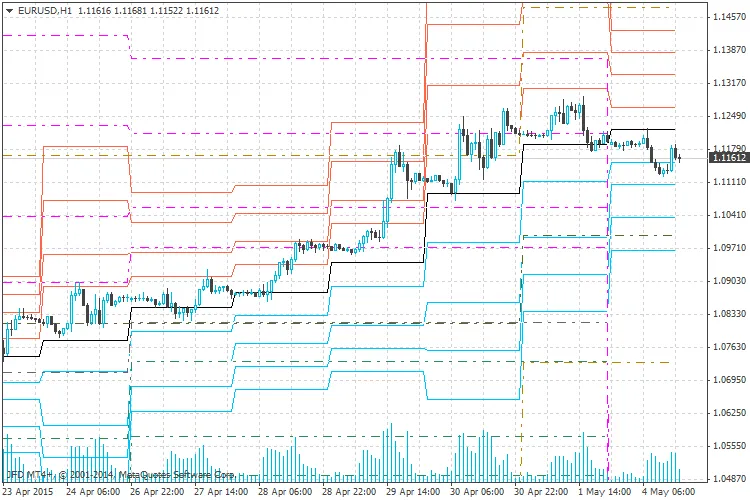
The Pivot Point (PP) indicator is an essential tool for traders operating on smaller timeframes, such as hourly or 15-minute charts. This custom version is designed to work with daily, weekly, and monthly levels, providing a flexible edge for your trading strategy. If you're looking for a deeper dive into how pivot points function, you can check out the details here.
What's New with This Indicator?
- We've removed Sunday bars for those who trade with data feeds starting on Sundays at 22:00 UTC.
- The closing time used for calculations is based on the 20:00 UTC bar, which can easily be adjusted when you attach the indicator to your chart (input variable:
int closetime_UTC).
This indicator calculates daily pivot points based on the closing prices of the previous trading day's adjustable hourly bar. This feature is particularly useful if you want to focus on New York's closing price instead of the often arbitrary closing prices based on your local time or your broker's location. The default settings are tailored for the UTC time zone.
One unique aspect of this indicator is how it handles Sunday bars. These bars are eliminated and displayed similarly to Monday's bars, ensuring a smooth trading experience.
Weekly and monthly pivot points can provide additional insights for your technical analysis. You can opt to display these as well by adjusting the relevant input variables. Plus, midpoints for the current day can also be shown, offering further clarity.
The calculation method for pivot points varies for Mondays and Sundays, utilizing a switch statement to determine the TimeDayOfWeek. To ensure accurate calculations, the actual number of bars in the hourly timeframe (tracked by the variable hshift) is factored in until the start of the day. This hourly shift is then adjusted to pinpoint the specific bar needed for the pivot point calculation.
Important Note:
- This indicator operates on an hourly level, which means it can produce inaccurate values after the usual number of hourly bars is reached. In my case, that threshold is just over 3,500 hours, but this number may vary by broker. To keep your charts tidy, I decided to cut off the drawing before erroneous values appear, but they remain in the arrays!
I've made sure to comment the code thoroughly, and I welcome any constructive feedback to improve this indicator. If you find it useful, please take a moment to rate it in the Code Base and share it with your fellow traders!




Comments 0